

February 2026 Release Notes
SessionM platform release notes for February 2026 (release version 2026.1).
DETAILS
| Release to Staging | Release to Production | Release Version |
|---|---|---|
| Jan 20 - Jan 22, 2026 | Feb 10 - Feb 25, 2026 | 2026.1 |
There will be no downtime during the release.
Campaigns & Content
New Option in Campaigns: Include Min Spend Amount in Point Calculation
Feature Description for New Option in Campaigns: Include Min Spend Amount in Point Calculation
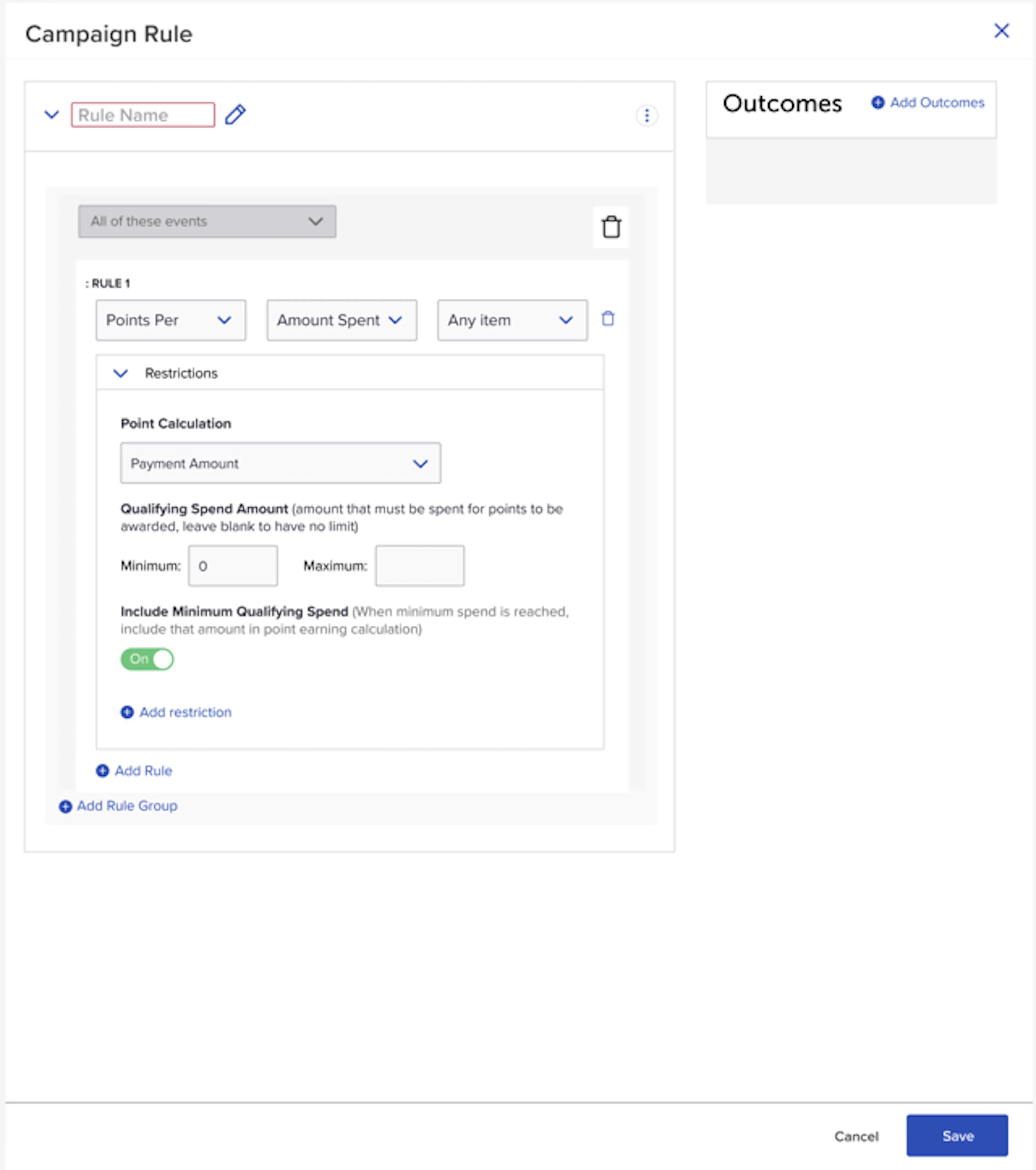
When setting up a Campaign behavior with a Points per Dollar outcome, Users will now have the option to choose whether to include or exclude the declared “Minimum amount spent” in the total considered for Point Calculation.
Example
For example, consider the following campaign variations:
- Spend at least $10, earn double points on your entire order!
- For a limited time, earn double points on all spend beyond $10!
Scenario 1 would be configured with the “Include Minimum Qualifying Spend” toggle set to “On.” The customer has to spend at least $10, but as long as they do, they’ll earn double points for the entire spend
Scenario 2 requires the “Include Minimum Qualifying Spend” toggle to be turned “Off. ” This will require the customer to spend at least $10, and will only award double points on the spend that exceeds $10. So if a customer spent $15 they would only earn double points on the $5 that was spent on top of the $10 minimum.
Updated Campaign Date Ranges Selector
Feature Description for Updated Campaign Date Ranges Selector
When setting up a campaign, the date range selector has been updated to use a more standard workflow and match other range selectors in the platform. This affects the campaign runtime, opt-in start/end dates and triggered message start/end date. Changes include:
- Dates and times can be entered manually without opening the selector menu
- Selected dates are now shown using a 24 hour clock rather than an AM/PM designation
- Seconds are no longer selected when choosing a time
- When navigating between months the whole selector is updated rather than each side individually
Loyalty
Reward Store Redesign
Feature Description for Reward Store Redesign
The reward store module has been rebuilt to improve usability and clarity of configurations. It has been improved to include:
- Improved listing page with more standard elements and addition of status label in the table.
- Creation flow has been streamlined and simplified using standard page elements to improve usability.
- Improved flow for finding, adding and managing offers with search and filter available.
- Improved flow for finding and adding associated point accounts.
- View only mode to prevent accidental edits.
Point Management Redesign
Feature Description for Point Management Redesign
The point management module has been rebuilt to improve usability and clarity of point configurations. It has been improved to include:
- Improved listing page with more standard elements and addition of grouping label in the table to quickly see which point accounts are associated
- Creation has been streamlined and simplified to better explain how the configurations work
- Overhaul of point expiration setup to clarify how point expiration rules and point evaluation jobs are setup to ensure a smooth point expiration process
- Redesign of point source restrictions to improve clarity and prevent errors
- Complete update of language and help text
- Removal of Point Account Audit Log (now accessible only in the customer profile where it is easier to use and understand.
Platform Wide
Multi-Org: Loyalty
When using Multi-Org, the Loyalty modules will restrict access to Programs, Rules, and Templates based on the SMP Users Multi-Org permissions. New configurations will include an Org assignment step and APIs will allow for filtering of results per Org.
Use Cases for Multi-Org: Loyalty
- Give teams self service access to Loyalty Management since Multi-Org permissions restrict the configurations they see and can adjust.
- Create Loyalty Programs, Rules, and Templates for individual Orgs or at higher levels in the hierarchy so they’re shared by many Orgs.
- Pass Org IDs in API requests to only retrieve loyalty and tier data for specific Org(s).
How it Works for Multi-Org: Loyalty
- Loyalty Programs, Rules, and Templates are associated with Orgs at the time of creation so the system can control where and by whom they can be accessed.
- Assign Templates to any level in the Org hierarchy to control which Loyalty systems they can be applied within.
- Org information will be present in the API and Data Lake enabling integrations to deal with Org data separately
SWAGGER APIs: On January 22, 2026, after the staging deployment, Swagger API Documentation for this change will be available.
Multi-Org: Points
When using Multi-Org, the Point Management module will restrict access to Point Source and Account configurations based on the SMP Users permissions. Creating new Sources or Accounts will include an Org assignment step and APIs will allow for filtering of results per Org.
Use Cases for Multi-Org: Points
- Give teams self service access to Point Management since Multi-Org permissions restrict the configurations they see and can adjust.
- Create Point Sources and Accounts for individual Orgs or at higher levels in the hierarchy so they’re shared by many Orgs.
- Pass Org IDs in API requests to only retrieve point data for specific Org(s)
How it Works for Multi-Org: Points
- Point Sources and Accounts are associated with Orgs at the time of creation so the system can control where and by whom they can be accessed.
- Mark Accounts and Sources as Unlocked to allow them to be used in lower level Orgs.
- Org identifiers will be present in the API and Data Lake enabling integrations to deal with Org data separately
SWAGGER APIs: On January 22, 2026, after the staging deployment, Swagger API Documentation for this change will be available.
Multi-Org: Reward Stores
When using Multi-Org, the Reward Store modules will restrict access to Reward Stores based on the SMP Users Multi-Org permissions. New configurations will include an Org assignment step and APIs will allow for filtering of results per Org.
Use Cases for Multi-Org: Reward Stores
- Give teams self service access to Reward Store module since Multi-Org permissions restrict the configurations they see and can adjust.
- Create Reward Stores for individual Orgs or at higher levels in the hierarchy so they’re shared by many Orgs.
- Pass Org IDs in API requests to only retrieve reward store and reward store offer data for specific Org(s)
How it Works for Multi-Org: Reward Stores
- Reward Stores are associated with Orgs at the time of creation so the system can control where and by whom they can be accessed.
- Only Offers assigned to Orgs pertinent to the Reward Store’s Org will be eligible to add to the Reward Store.
- Org information will be present in the API and Data Lake enabling integrations to deal with Org data separately.
NOTE: Current Multi-Org tenants will have the above features activated at a later date.
SWAGGER APIs: On January 22, 2026, after the staging deployment, Swagger API Documentation for this change will be available.
Multi-Org: Profile Attributes
When using Multi-Org, brands will be able to create separate Custom Profile attribute models per Org.
Use Cases for Multi-Org: Profile Attributes
- If Org A and Org B want to store and maintain different data on customer profiles, they’ll be able to do so in different sections of the profile independent of one another.
How it Works for Multi-Org: Profile Attributes
- Create a new custom profile attribute model and assign to an Org.
- Populate attributes for relevant customer profiles.
- Customers module will only display relevant profile attributes based on the SMP User’s active Org.
Multi-Org: SM Sync Event Importer
When using Multi-Org, the Events importer now accepts an Org parameter. This enables bulk imports of Events belonging to one or more Orgs.
Use Cases for Multi-Org: SM Sync Event Importer
- Send events for multiple customers, specifying the Org each event is meant for.
- Create an Audience of an Org's customers based on their event history.
- Create Campaigns with Event behaviors for specific Org.
How it Works for Multi-Org: SM Sync Event Importer
- SM Sync Event files now accept an optional
division_idcolumn. - Records including a
division_idvalue will process the event against the specified Org’s campaigns. - Records without a
division_idvalue will process the event using the root Org. - For more specifics on the Event importer file specification, visit the SM Sync Importers Guide.
Support and Administration
Event Management Redesign
Feature Description for Event Management Redesign
The event management module has been rebuilt to improve usability and prepare for better integration with other features in the platform. It has been improved to include:
- Ability to search for an event by name
- Quick copy functionality of the event symbol to allow for pasting into campaign behaviors or loyalty rules where those are needed
- Improved display of event status to clearly see which are enabled or disabled
- Enhanced compliance with platform UI standards
- Event picker from Rules Management now shows all events with ability to create new events within the picker to simplify rule creation
General Announcements
Data Export Schema Document
We are excited to announce that a revitalized Data Export Schema document has just been published to our Learning Hub. Moving forward, we are committed to maintaining this resource regularly. The Data Export Schema will now align with our release schedule, with new versions and detailed changelogs accompanying every major release.
Under Construction: Custom Logo
We're making some changes to improve the consistency and availability of our user interface. If you're using a Custom Logo in the Header of your SessionM admin, for a short time you may see that replaced with a default SessionM logo as you navigate around the SessionM admin.
This is an intentional, temporary change that will be resolved in the next release. Thank you for your patience and understanding.
Bug Fixes
Customers
- Fixed an SM Sync issue where user_update operations failed with "primary external id is invalid" error. The validation has been adjusted to distinguish between different flow types while maintaining data integrity.
- Improved User Importer v2 to properly handle blank fields for certain datatypes. Blank fields are now treated as omitted rather than triggering validation errors.
- Corrected User Create V2 SM Sync Job to properly create Customer Profiles based on input file data.
Data
- Reduced the number of data cloud hydration failures through system improvements.
Engagement
- Resolved failures with Audience Exports not being written to the SFTP server.
- Fixed intermittent failures occurring with Audience Snapshots.
- Fixed UI bug where creating a second message with empty spaces automatically added a number to the message name.
Loyalty for Bug Fixes
- Resolved performance degradation issues with the new Points engine.
- Improved Point Expiration Summary API to return a default value when no expiration policy is set, instead of returning a 500 error.
- Enhanced error handling in the Points Spend API to return appropriate 400 errors instead of 500 errors.
- Fixed Loyalty rules engine issue where certain scenarios caused user rule progress to incorrectly go negative.
- Resolved an issue during tier migration where NextMaintenanceDueUTC was incorrectly calculated, causing maintenance to run immediately for migrated users. Users now migrate with the expected maintenance schedule.
- Fixed the Point Management UI expiration policy configuration. Removed the "months" option which had no corresponding backend support, preventing misconfiguration.
Offers
- Campaign Offer outcome selector now correctly filters out completed Offers from the selection list.
- Fixed display issue where newly added Offers to a Rewards Store showed incorrect pricing.
- Fixed user-offer-update SM Sync job to successfully update offers issued via Reward Store API.
- Reverted an unintended change to the Purchase Reward Store Offer API response structure.
Campaigns & Content
Minimum spend in point calculation, and a rebuilt campaign date-range selector.
Loyalty
Redesigned Reward Store and Point Management screens.
Platform Wide
Multi-Org support across Loyalty, Points, Reward Stores, Profile Attributes and SM Sync.
Support and Administration
A redesigned Event Management experience.
General Announcements
The Data Export schema document, and the Custom Logo change now under construction.
Bug Fixes
Fixes across Customers, Data, Engagement, Loyalty and Offers.