

August 2026 Release Notes
SessionM platform release notes for August 2026 (release version 2026.2).
DETAILS
| Release to Staging | Release to Production | Release Version |
|---|---|---|
| July 7 - July 9, 2026 | July 28 - August 12, 2026 | 2026.2 |
Explore the latest updates designed to improve flexibility, visibility, and customer engagement.
Pay With Points
Customers can now use loyalty points to pay for part or all of a transaction through native Pay With Points support. Merchants can configure custom point-to-currency conversion rates and support multiple redemption partners.
Use case
Enable customers to redeem loyalty points directly at checkout.
How it works
- Navigate to the Offer Management module and create a “Pay With Points” offer type.
- After configuring and publishing the offer, navigate to the Reward Store module.
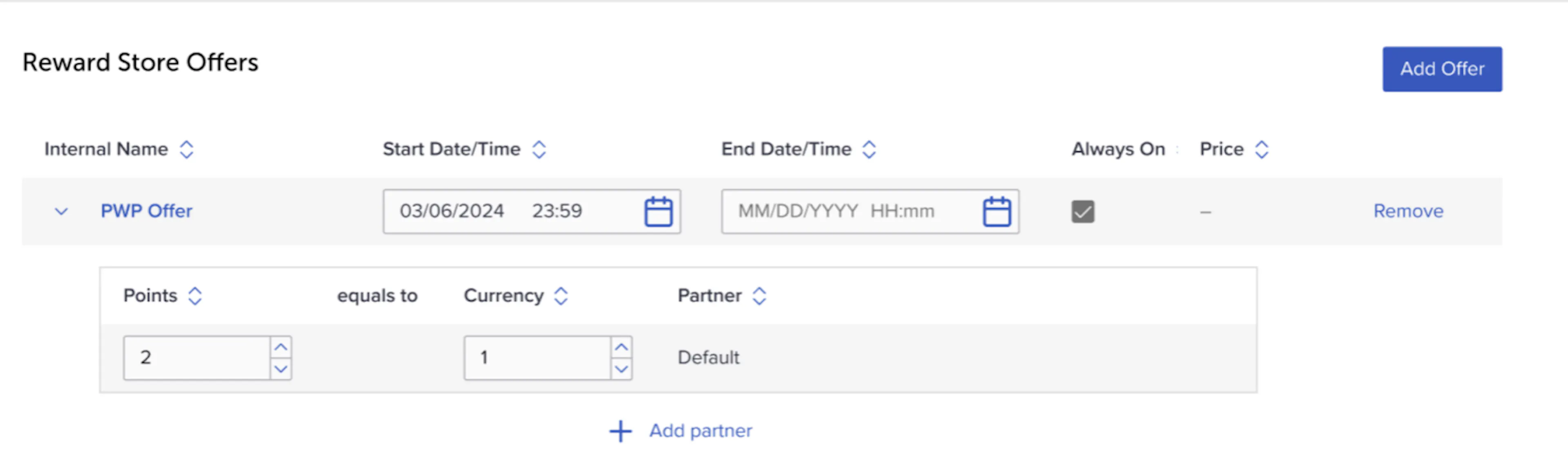
- In the “Reward Store Offers section”, click “Add Offer” and add your PWP offer.
- PWP offers will be zero point reward store offers (available to everyone who has access to the reward store). You will be unable to change the price.
- Input your conversion rate.
- The first conversion rate will be associated with a “Default” partner. However, you can add multiple partners and conversion rates as desired.
- Complete the reward store configurations and you are ready for customers to redeem their points!
- When calling the POS Redeem API for PWP offers, you will now need to provide two new fields:
- Number of points the customer would like to redeem in the transaction.
- Partner name – This can be omitted if you only have one partner (default).
- The system will dynamically calculate the discount to be applied to the subsequent transaction. This follows the same pattern as our existing POS redeem flow.
- When calling the POS Redeem API for PWP offers, you will now need to provide two new fields:
Audit Log Data
New audit logging capabilities have been introduced to improve visibility into configuration changes and support auditing, reporting, and compliance needs.
Use cases
- Monitor program configuration updates.
- Support auditing, reporting, and compliance initiatives.
- Maintain a historical record of platform changes.
How it works
- Audit log data can now be included in daily data exports.
- Users can also generate on-demand exports through Composer.
- Logs capture key actions such as: Create, Update, Delete, Activate, Deactivate, and Configuration changes.
- Each record includes the affected object, action performed, user responsible, and timestamp.
For information on enabling audit log exports, please contact your customer representative.
Campaign Progress
New tables and a new query have been introduced to uncover user progress towards a specific campaign goal.
Use case
Identify customers who are close to completing a campaign objective and engage them with targeted messaging or follow-up campaigns or program configuration updates.
How it works
New tables and queries allow users to retrieve campaign progress data using a campaign ID. Results can be exported or used to build audiences for future campaigns and engagement activities.
For information on enabling this functionality, please contact your customer representative.
Anomaly Detection
Several improvements have been made to anomaly detection to increase accuracy, improve visibility, and provide clearer explanations of detected anomalies.
Point Activity Monitoring Improvements
Use cases
- Improve anomaly detection accuracy.
- Reduce false positives.
- Ensure anomalies are evaluated against a consistent user population.
How it works
Previously, customers were filtered based on transactions within the last 24 hours, while anomaly detection features analyzed up to 30 days of transaction history.
The updated approach aligns both windows by:
- Filtering customers with transactions within the last 7 days.
- Using only features derived from the same 7-day transaction history.
This guarantees consistently precise anomaly detection, giving you clearer insights and better decisions.
Expanded Point Activity Visibility
Use cases
- Detect unusual point earn and burn behavior.
- Identify potentially suspicious non-transactional point activity.
How it works
- The dashboard now tracks all point earn and burn events.
- Accounts exceeding anomaly score thresholds are shown in the Insight dashboard (Atypical Behavior tab) and stored in Data Lake in
v_anomaly_detection(last run only) andanomaly_detection_hx(last 7 days of atypical behavior history).
Simplified Anomaly Score Explanations
Use case
Help users better understand why a behavior has been flagged as atypical.
How it works
Alongside contributing anomaly features, reference values for the entire population have been added:
- The customer’s feature value.
- Reference values – Median and top 10%.
This makes anomaly scores easier to interpret and investigate.
Reward Store
Several Reward Store improvements have been introduced to streamline administration and improve visibility into store configurations.
Edit Directly From View Mode
Use case
Quickly modify Reward Store settings without navigating away from the current page.
How it works
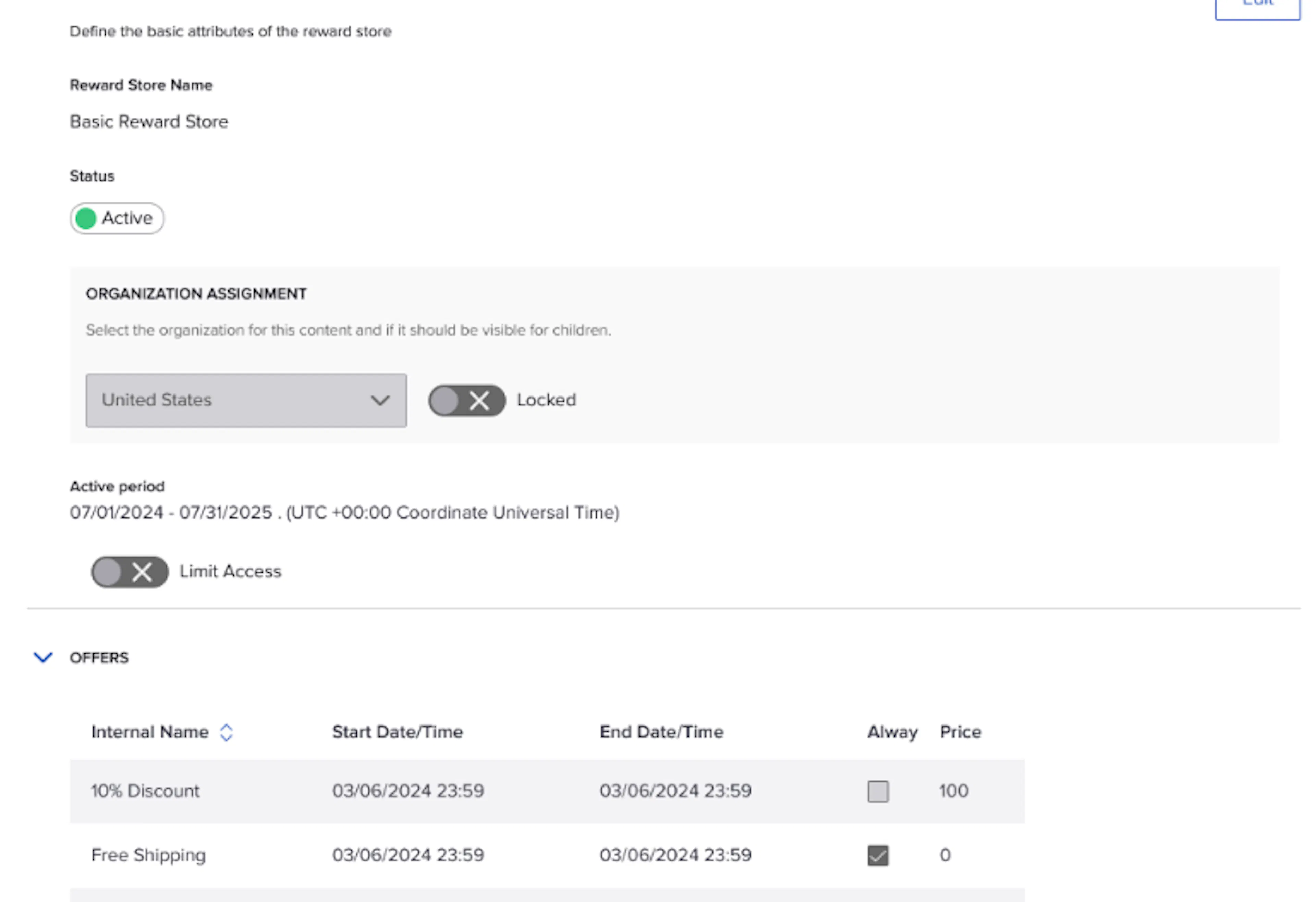
An Edit button has been added to View mode, allowing users to switch directly into editing from the Reward Store details page.
Visibility of Expired Reward Stores
Use case
Review historical Reward Store configurations alongside active stores.
How it works
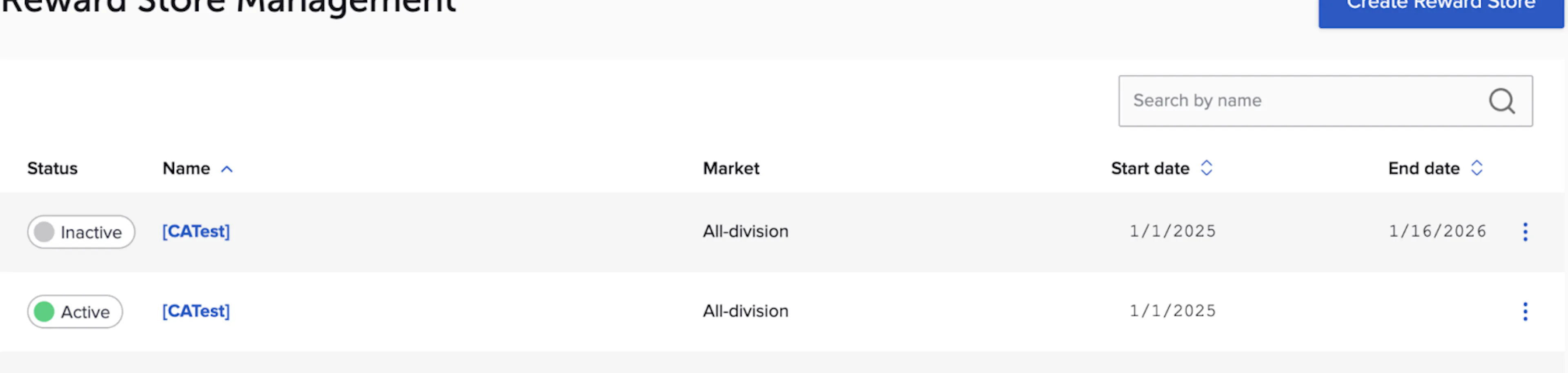
Expired Reward Stores are now displayed in the Reward Stores table together with active and upcoming stores, making it easier to access and review past configurations.
Stay tuned for more enhancements in upcoming releases.