

May 2025 Release Notes
SessionM platform release notes for May 2025 (release version 2025.2).
DETAILS
| Release to Staging | Release to Production | Release Version |
|---|---|---|
| April 23 - 24, 2025 | May 13 - 19, 2025 | 2025.2 |
There will be no downtime during the release.
Campaigns & Content
Campaign Behaviors Reference Custom Transaction Data
Feature Description for Campaign Behaviors Reference Custom Transaction Data
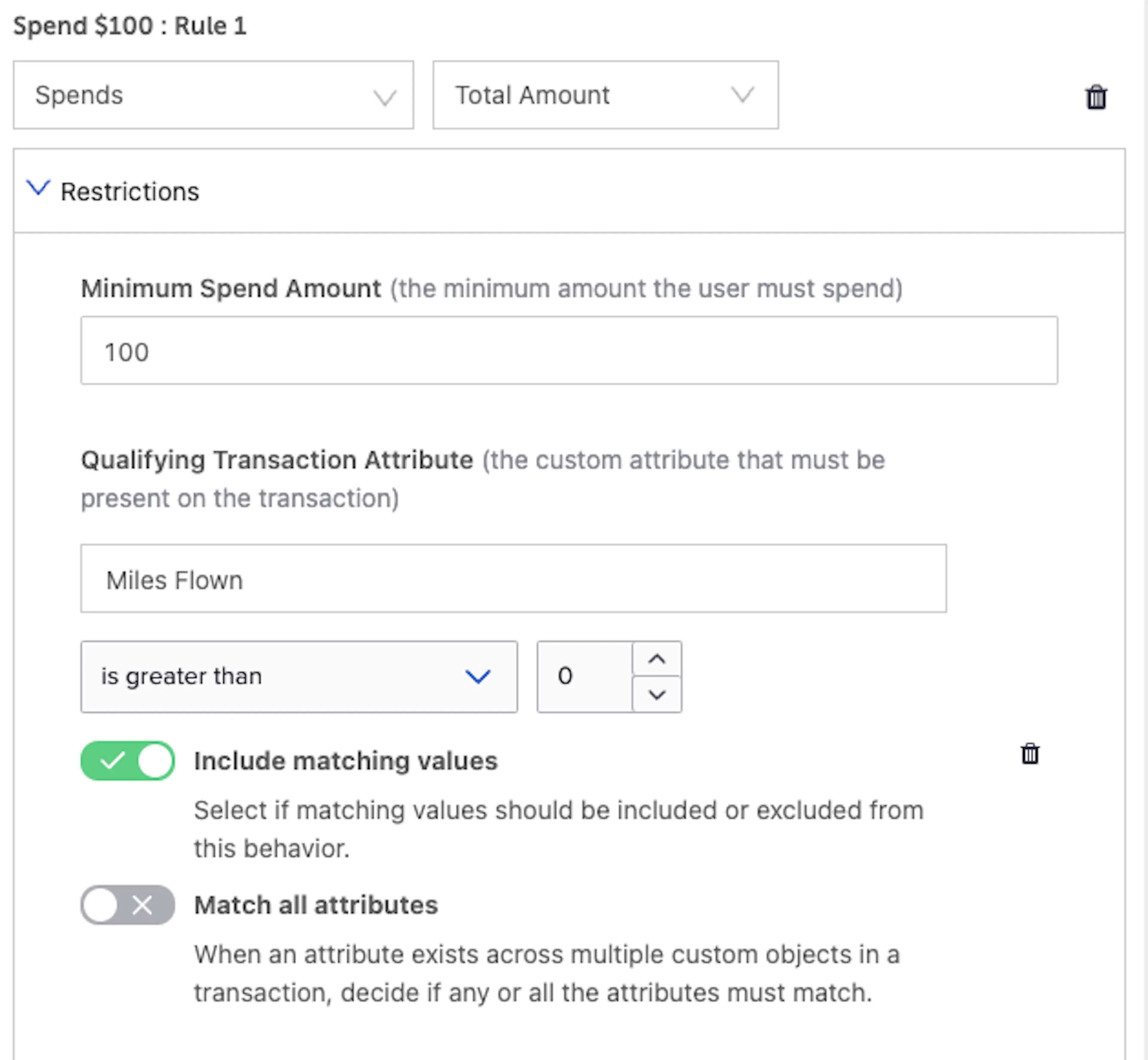
SessionM supports the ability to send custom data in the business defined object of the transaction (see this Explainer for more details). Campaigns is adding a new restriction for all purchase behaviors called Qualifying Transaction Attribute. This enables you to create promotions using your unique business data.
How it Works for Campaign Behaviors Reference Custom Transaction Data
- For all purchase behaviors, there will be a new restriction called Qualifying Transaction Attribute
- Once selected, you can choose the variable you would like to reference. This can be done via dropdown or typing out the name with the help of autocomplete
- After selecting a variable you can configure the rule condition. The overall user experience will change based on the selected variable type. For example, a boolean variable will display true or false but a numeric variable will show options like “greater than” .
- There will be two toggle buttons at the bottom of the restriction:
- Include matching values
- This is an include or exclude toggle. It controls whether the designated selections will qualify for the campaign behavior
- It will be selected (include) by default
- Match all attributes
- This toggle is only relevant for clients who submit multiple objects in the business defined collection. If you do, this will allow you to determine if the criteria must be met in all objects or just one.
- This toggle will be unselected (any) by default
- Include matching values
Example
- Shopped with a reusable bag, earn Double points
- Ordered through a preferred third-party ordering provider, earn $5 off your next order
- Flight segment was over 1,000 miles, earn 100 bonus points
Update Progress and Revoke Outcomes During Return Scenarios
Feature Description for Update Progress and Revoke Outcomes During Return Scenarios
Campaigns will have robust refund capabilities for all purchase behaviors. This will include the ability to revoke various outcome types and update user campaign progress accordingly.
How it Works for Update Progress and Revoke Outcomes During Return Scenarios
When a refund is submitted, Campaigns will check if the transaction is voided or if the items have changed. If it meets either of those criteria, Campaigns will rerun the transaction against any of the purchase rules it made progress against. If the user’s progress on the rule is changed by the return, Campaigns will continue processing the refund.
Before removing user progress, Campaigns will check to see if an outcome was awarded. If no outcome was awarded, then Campaigns will take away the user progress. If an outcome was awarded, Campaigns will evaluate if the outcome can be revoked before taking away user progress.
Outcomes That Can Be Revoked (points and Offers)
Points
- Campaigns will check if the point account that received the points in the original transaction has enough points to revoke. If not, it will not try to revoke the points or user progress. If it does, it will revoke the points and remove the user progress. If the point account is configured to allow a negative balance, campaigns will revoke the points and user progress even if there are not enough points to revoke
Offers
- Campaigns will check if the offer has been redeemed. If it has, it will not try to revoke the offer or user progress. If not, it will revoke the offer and remove the user progress
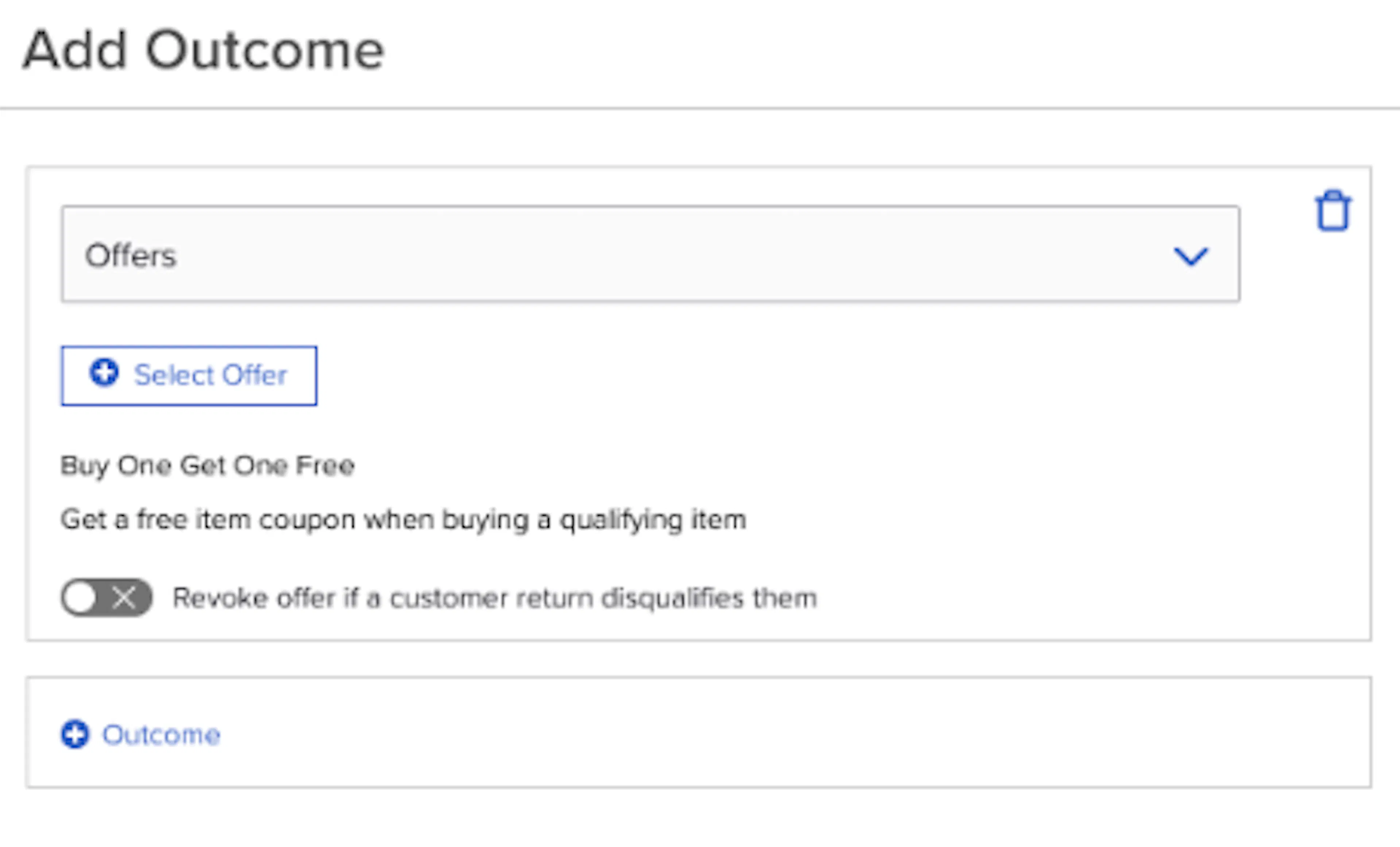
- Campaigns will allow you to configure whether an offer can be revoked. In the outcome modal, there will be a toggle that controls this. It will be toggled off (cannot be revoked) by default:
If an outcome has both points and offers, Campaigns must be able to take away both outcomes. If it cannot, it will not remove user progress.
Outcomes That Cannot Be Revoked (tags, Triggered Events, Promo Codes)
Campaigns cannot remove any of the above outcomes. If a behavior only has one of these outcomes, Campaigns will not take away user progress
If an outcome contains both an outcome that can be revoked and an outcome that cannot be revoked, then campaigns will take away progress if the revokable outcome is removed. This means a customer could get the other outcome again if they achieve the behavior again. For example, a behavior gives both an offer and tag outcome. During refund processing we will take away the offer but not the tag. They will be eligible to receive both the offer and tag if they achieve the behavior again.
Refunds will respect any frequency caps placed on the behavior. For example, a user makes a purchase to achieve a behavior that sets Max Times Behavior Qualifies Toward Outcome = 1. If they refund that purchase and Campaigns is able to revoke the outcome and decrease progress, they will be able to achieve it again. If Campaigns is unable to revoke the outcome and progress, they will be unable to achieve again as the maximum is still met.
When determining how much user progress to take away, Campaigns will now factor in minimum spend and item count restrictions. If the refund causes the user to fall below the minimum then the refund will revoke the outcome and remove user progress.
Campaigns will also consider prerequisite behavior restrictions. For example, a campaign has two behaviors and the second behavior has a prerequisite behavior restriction of the first. If a user achieves the first behavior then proceeds to void the transaction that achieved the behavior, they will need to achieve this behavior again before being eligible for the second behavior.
Campaigns will not take into account any restrictions besides those mentioned above when reprocessing rules.
Example
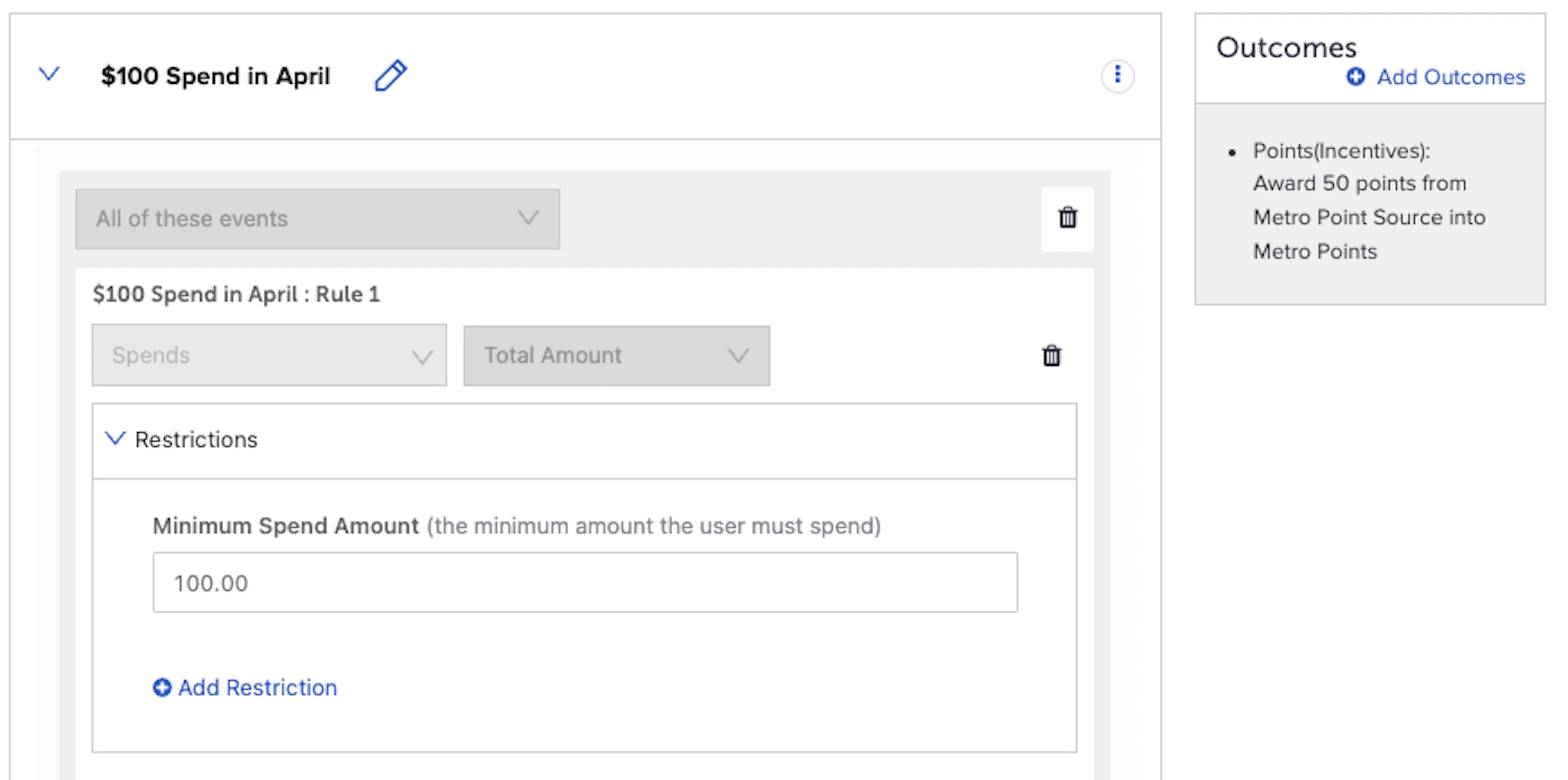
User is eligible for the following campaign behavior that gives 50 points for spending $100 in April:
They then submit the following transactions:
- Transaction 1: $80
- Transaction 2: $50
The second transaction causes them to achieve the behavior and receive the outcome. The user progress in the Campaigns API response will look like:
"achieved": 1,
"current_count": 30,
"total_count": 100
User does a full return of the second transaction. The transaction amount from Transaction 1 is now below the minimum spend amount. Campaigns will revoke the 50 points and remove the user progress accordingly. The progress for the user will now look like:
"achieved": 0,
"current_count": 80,
"total_count": 100
Reporting
To enable accurate reporting on refund scenarios and campaign engagement, we have added the following action types to the campaign_activity table in the data cloud:
| Action Type | Description |
|---|---|
| goal:achievement:regress | Progress for a goal (rule) was lost due to the refund |
| goal:achievement:forfeited | Rule completion has been lost due to the refund |
| composite:achievement:regress | Progress for a behavior was lost due to a refund |
| composite:achievement:forfeited | Behavior completion was lost due to the refund |
| outcome:awarded:offer | Successfully award an offer or points outcome to a user |
| outcome:awarded:incentives | |
| outcome:error:offer | Unable to successfully award an offer or points outcome to a user |
| outcome:error:incentives | |
| outcome:revoked:offer | Successfully revoke an offer or points outcome from a user |
| outcome:revoked:incentives | |
| outcome:not_revoked:offer | Unable to successfully revoke an offer or points outcome from a user |
| outcome:not_revoked:incentives |
New Message Validations
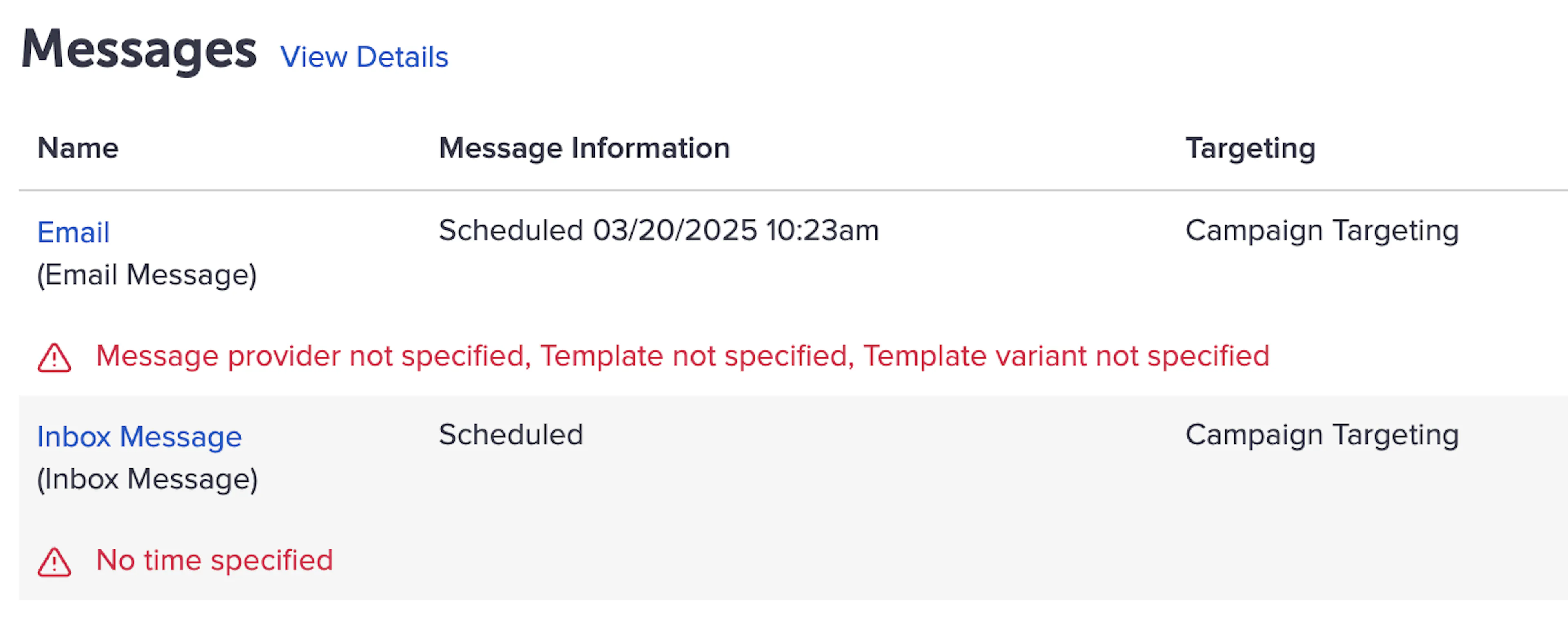
There will be new warnings shown when you leave the following fields blank during message setup:
- Message Provider
- Template
- Template Variant
New and existing warnings (ex. when the scheduled delivery date is blank) will display in a new format shown below. This will bring greater visibility to issues in message setup and prevent launching messages without critical information.
Easier Access to Add Behavior Restrictions
When adding a Behavior, “Apply Restrictions” was previously the only option under the three-dot menu. To simplify access, that option has been removed and replaced with a link titled “+ Behavior Restrictions."
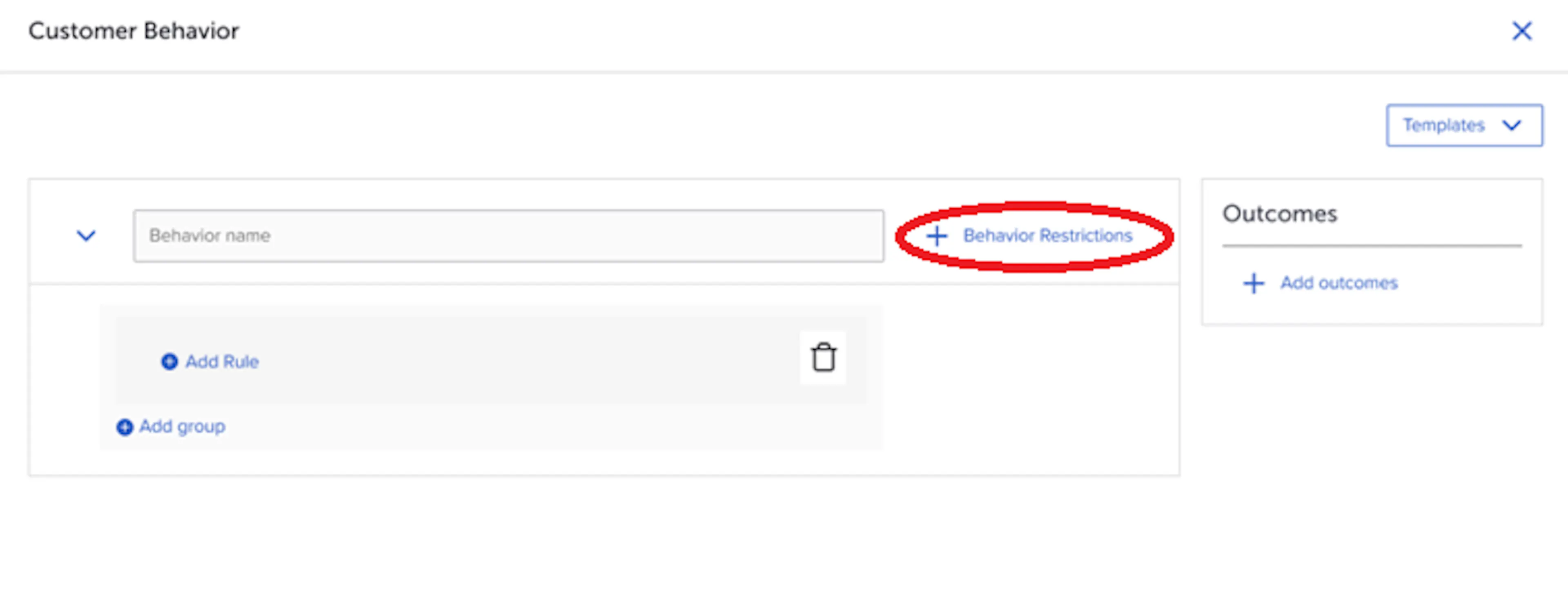
This opens the same modal as before, with a text change to the first field's description
Previous text:
“Max Times Behavior Qualifies Towards Outcome (total number of times the user can complete this behavior to earn the outcome)”
Updated text:
“Outcome Limit (maximum number of times a user can earn the outcome for the overall behavior. Behaviors may contain multiple rules—use the Frequency Cap restriction to limit a single rule).”
Customers & Audiences
Composer Data Available in the Data Lake
Feature Description for Composer Data Available in the Data Lake
Two new views have been added to the Data Lake to unlock new reporting capabilities for Composer audiences and exports:
-
composer_audiences: contains attributes on Composer audiences. Use this table to answer questions like:- How many active audiences do I have?
- Is this audience dynamic or static?
- When was this audience created?
-
composer_exports: contains attributes on Composer exports. Use this table to answer questions like:- How many active exports do I have?
- Is this export repeating or one-time?
- When did I delete an export?
Loyalty
Calendar Support for Point Source Restrictions
This feature is available only to clients who have upgraded to our new points engine. Please reach out to your SessionM representative with any questions.
Feature Description for Calendar Support for Point Source Restrictions
SessionM is introducing the ability to enforce point source frequency restrictions based on calendar days, allowing you to create earning restrictions that are intuitive to your customers: “A maximum of 1000 points can be earned per week” .
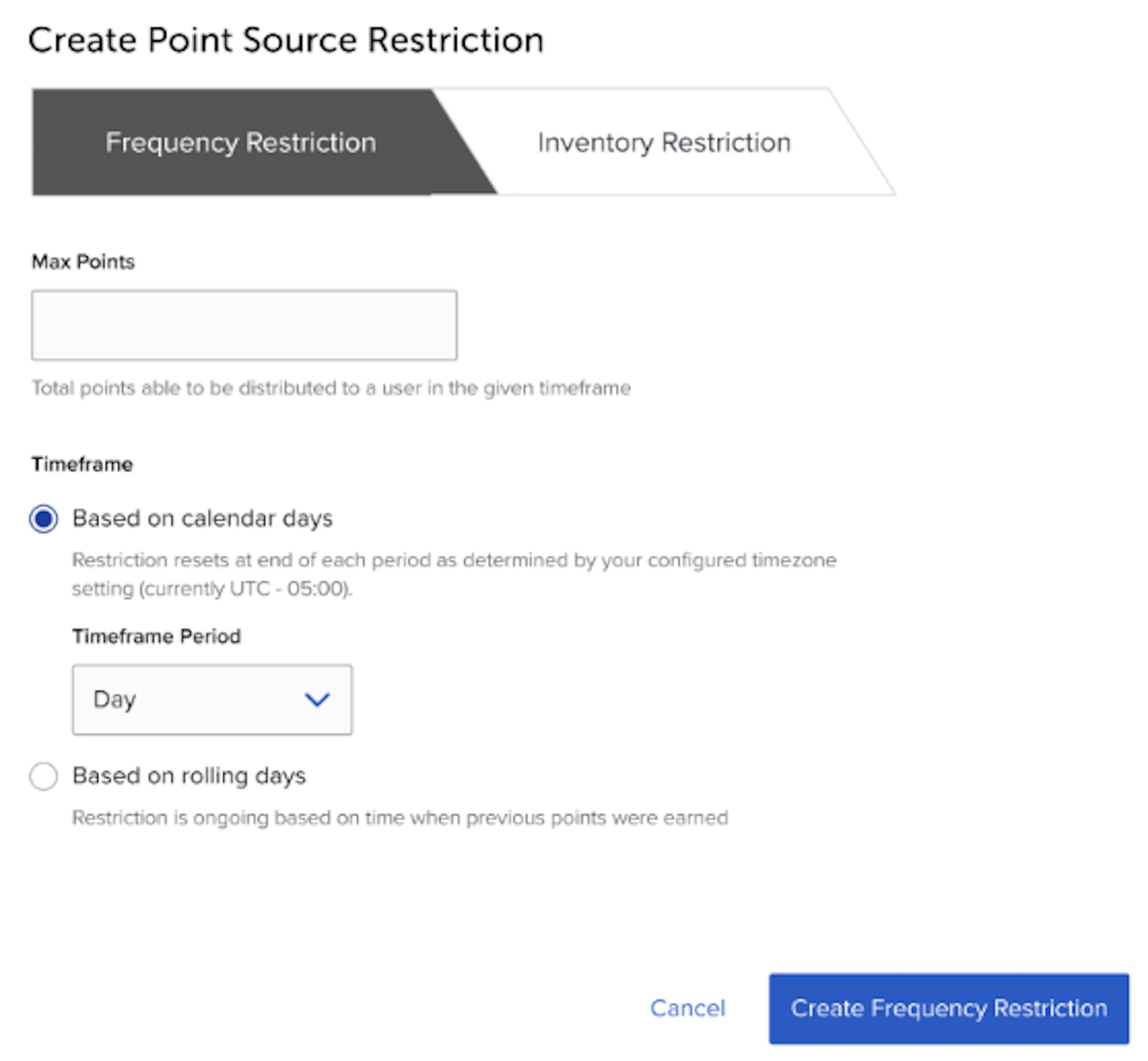
How it Works for Calendar Support for Point Source Restrictions
- Select the “Based on calendar days” toggle
- The help text displays the timezone that is used for the calendar options
- The timezone setting will default to UTC time but it is configurable. Please reach out to your SessionM representative if you would like to change this setting
- Select one of the following options
- Day
- Month
- Quarter (newly added)
- Year
- The above options are restricted based on the current time period
Examples
You can configure either of the following point source restrictions:
- 10,000 points per calendar month
- 10,000 points per rolling month
Loyalty 2
Improved Outcome Revoking in Tier Movement Scenarios
Feature Description for Improved Outcome Revoking in Tier Movement Scenarios
Members of a loyalty program make a purchase that moves them to a higher tier, then later return or cancel that purchase. SessionM’s new loyalty engine now properly identifies and revokes points and offers outcomes earned in the above scenarios.
How it Works for Improved Outcome Revoking in Tier Movement Scenarios
- A member is in the Silver tier and makes a transaction that results in an outcome of 50 points
- The member subsequently moves up to the Gold tier and then voids the transaction
- The rules engine revokes the 50 points
- Previously, the rules engine would not revoke the 50 points because the member was no longer in the tier where they earned the points
Platform Wide
New SM Sync Importer
Feature Description for New SM Sync Importer
SessionM strives to allow for maximum flexibility in integration options available for syncing your data with the SessionM platform. In accordance with this principle, we’re excited to introduce a new importer available for use.
Merge Customer Importer
The Customer Merge API allows you to identify two profiles that you want SessionM to merge into one. Now, SM Sync supports a file-based mechanism for performing these merge operations in bulk. This is helpful in contexts where duplicate accounts are being identified in batch – rather than make individual API calls for each of the identified duplicate accounts a single file can be provided in order to execute the merge process.
How it Works for New SM Sync Importer
- Output a file in the required format, outlined in the Data Administration Guide
- Transfer the file to SessionM, based on the secure file transfer protocol established for your SessionM instance.
- SM Sync detects the file and processes the records, executing the merge operation for each record in the file.
- If there are errors encountered while processing any of the records, they will be captured and returned back to you in the form of an error file.
New Icon to Identify STG or ENT Environment
Feature Description for New Icon to Identify STG or ENT Environment
A new feature was added to identify the type of environment the user is in.
How it Works for New Icon to Identify STG or ENT Environment
The user will now see a staging label in the header to recognize whether they are working in the staging environment or production:

The production environment remains without a label:

Location Management (Early Adopters)
Feature Description for Location Management (Early Adopters)
Location data is a critical dataset in the context of your Loyalty tech stack. It allows you to understand where members are transacting, create eligibility restrictions in your promotions and offers, detect fraud, and trace liability across organizational divisions.
Location Management is the new and improved service SessionM is introducing to give merchants a simple and flexible way to manage their location data sets for their loyalty programs. It replaces existing systems: Store Management and Venues.
Built on the same technology that powers Product Catalog Management, Location Management boasts the following capabilities:
- Load locations by File Upload or via API
- Organize in hierarchical structure to categorize locations by region, type, and other characteristics for ease of navigation and selection within the interface
- Make restrictions to include or exclude a specific location, set of locations, and/or locations belonging to one or more categories – made available in a consistent picker across Offers, Campaigns, and Loyalty Rule management.
- Use location data in SessionM Data Cloud for advanced segmentation and reporting use cases to target members who have shopped or redeemed at a specific location, set of locations, and/or locations belonging to one or more categories
Location Management is now available as an upgrade for early adopters. There is no development required to activate and begin taking advantage of the enhanced experience. Changes to Store/Location data feeds will be required to take full advantage of Location Management's capabilities.
For more information and to sign up as an early adopter, reach out to your SessionM account representative.
How it Works for Location Management (Early Adopters)
- Set up a location data feed to sync your location data with SessionM (if you already have one set up it will continue to work)
- View your location catalog from the Location Management module
- Add location restrictions using the upgraded picker in either the Offers, Loyalty Programs or Campaigns modules.
Default Setting Change for Tags Used in Campaign Creation
Feature Description for Default Setting Change for Tags Used in Campaign Creation
The default setting for attaching a tag to a customer’s profile when the customer completes a defined behavior is currently set to 1 second.
The default setting was changed to 'tag(s) does not expire'.
Bug Fix: Styling Issues with the Checkbox Component
Due to a browser upgrade in Chrome, checkbox styling issues were observed in multiple locations across the platform. This release includes a fix that will mitigate the issue.