

August 2025 Release Notes
SessionM platform release notes for August 2025 (release version 2025.3).
DETAILS
| Release to Staging | Release to Production | Release Version |
|---|---|---|
| July 17 - 31, 2025 | Aug 5 - 19, 2025 | 2025.3 |
There will be no downtime during the release.
Campaigns & Content
Fixed Increment Point Awarding
Feature Description for Fixed Increment Point Awarding
SessionM Campaigns power promotions that incentivize high value behaviors by offering fixed or variable point outcomes as a result of a loyalty member exhibiting a desired behavior. Fixed Per Spend Increment is a new Variable point outcome option, which awards members with a fixed number of points for every unit of spend met from a single transaction. This feature is also available when evaluating item quantity rather than amount spent.
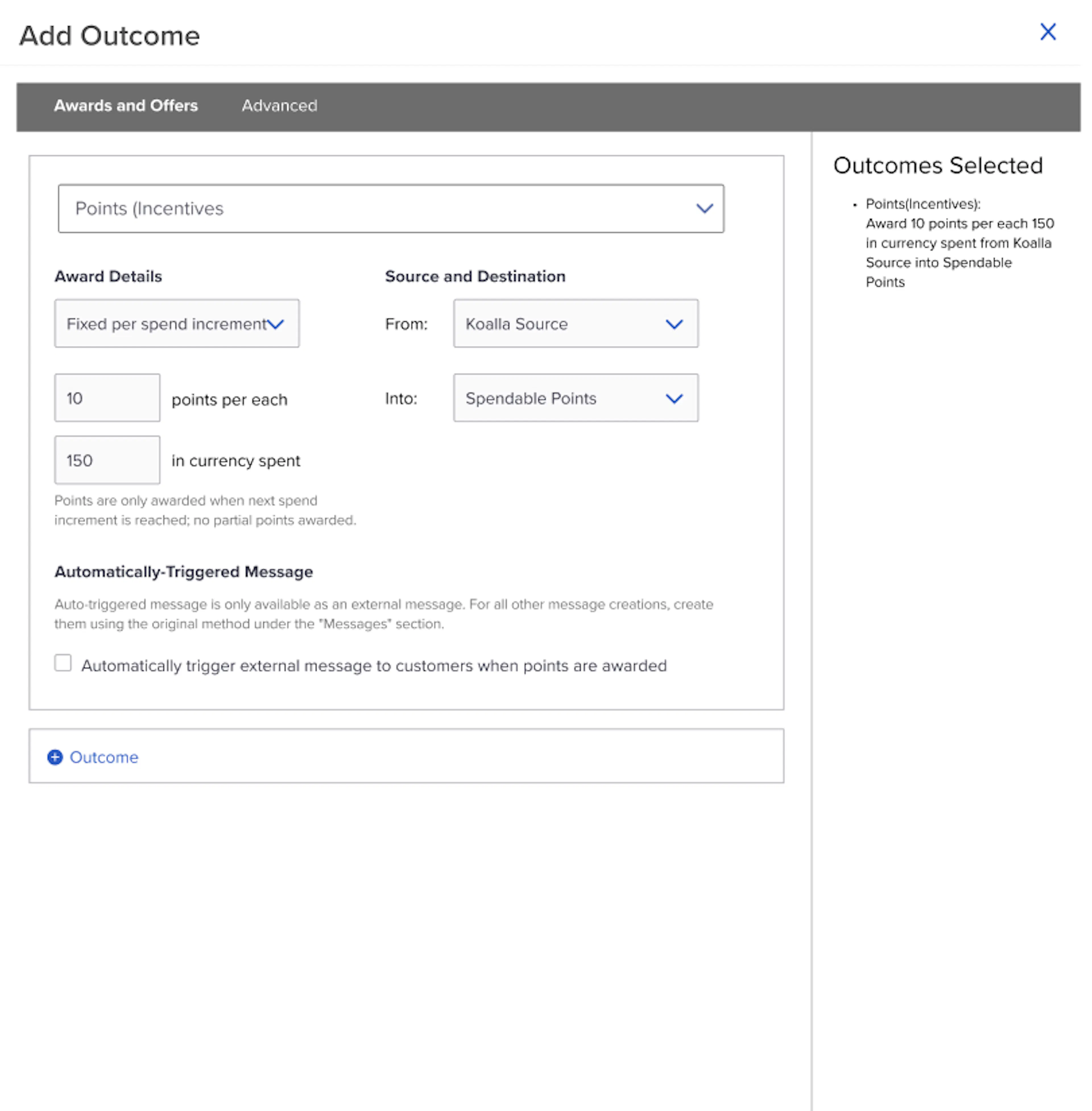
Creating a Campaign with a Fixed per Spend Increment Outcome
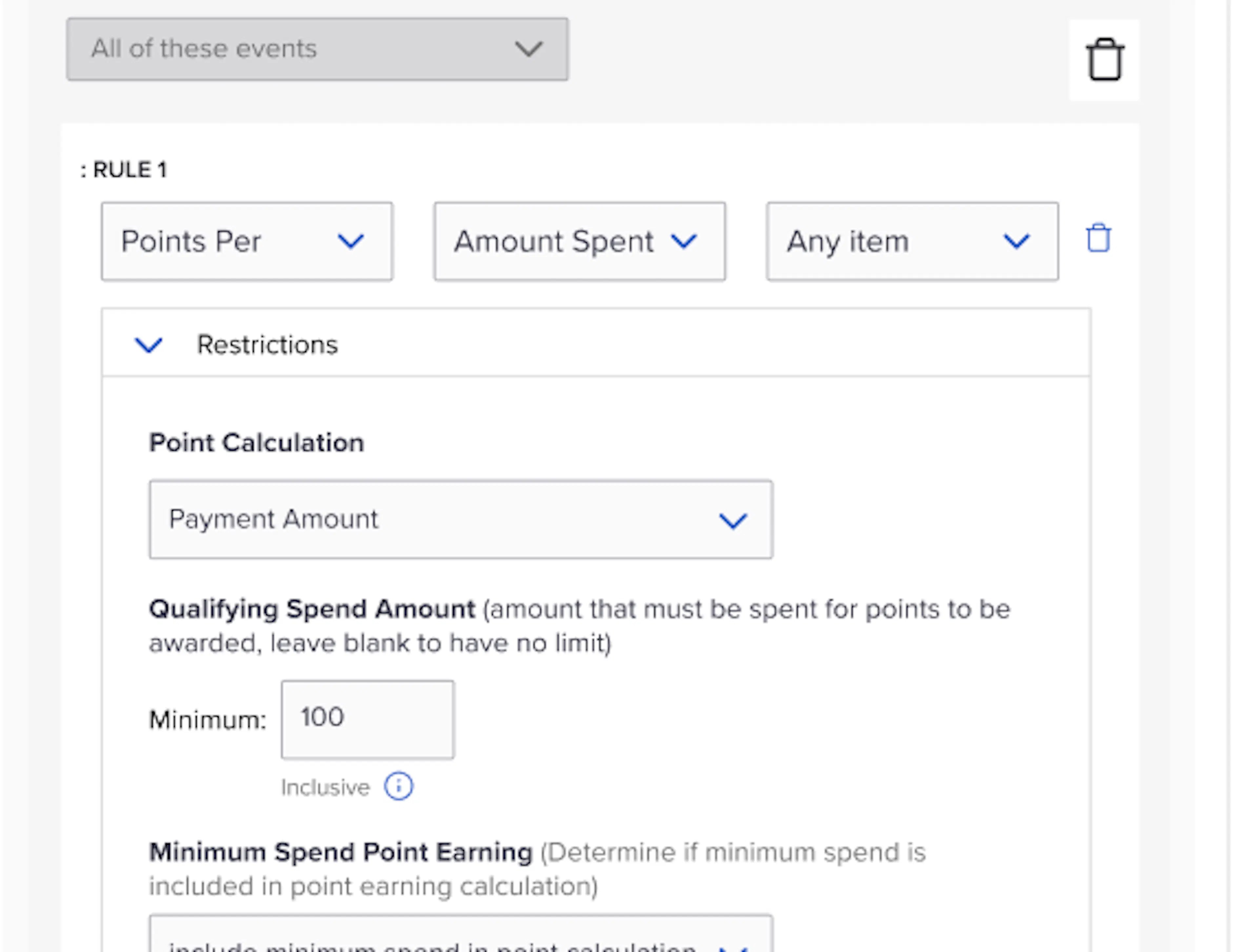
- Create a Points Per Amount Spend (or Item Quantity) Behavior
- Ensure that Minimum Spend Value in the Behavior Restrictions is set to be the same as the Increment that you want your Incremental Spend amount to be
- Now, when creating a campaign outcome, there will be a new outcome option called Fixed per spend increment
- Once selected you can specify the number of points you would like to award per currency spent or item quantity bought
How it Works for Fixed Increment Point Awarding
- When customers spend towards this campaign, they will receive the number of points specified in the campaign configuration when their cumulative spend reaches the specified threshold
- Partial points aren’t awarded until next threshold is met
- Only if the next increment is reached, the specified threshold points are awarded again accordingly
Example for Fixed Increment Point Awarding
- User is opted-in a 10 Points Per $100 Spent Increments Campaign
- User spends $100 in one transaction and receives 10 points
- User spends $50 in second transaction and receives 0 additional points
- User spends $200 in third transaction so they will receive an additional points 20 total points (and have a total of 30 points accumulated for this campaign)
Points Per Campaign Validation
Feature Description for Points Per Campaign Validation
There is now a new warning banner shown when you configure a Points Per behavior without a Points Per Dollar outcome, and vice versa.
The warning message will appear when the following scenarios occur:
- Points (Incentives) Outcome with Award Details of Per Dollar saved with any behavior besides Points Per
- Points (Incentives) Outcome with Award Details of Fixed Amount saved with a Points Per Behavior

This will prevent users from misconfiguring a Points Per campaign and ensure that the behavior and outcome is set up correctly before launching a campaign.
Unknown Catalog Items Toggle in Campaigns
Feature Description for Unknown Catalog Items Toggle in Campaigns
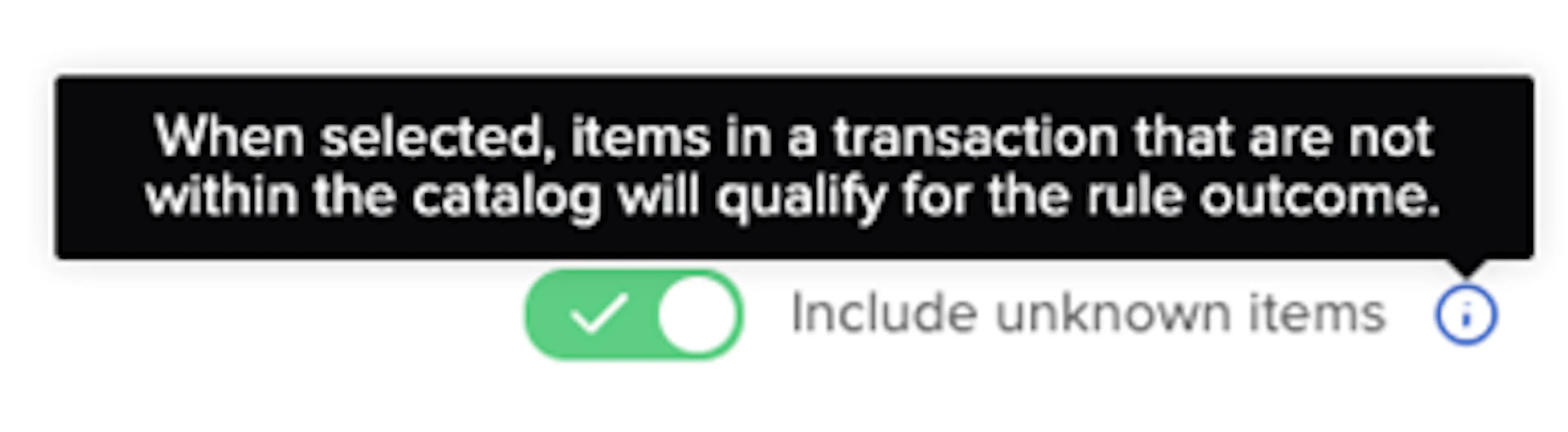
SessionM Campaigns now provide users the option to reward based on “unknown” items: those not included in an XCatalog but referenced in a transaction. If “Include unknown items” is toggled On, these items will be considered when Campaigns evaluates qualification criteria and calculates spend to use in variable point outcomes. This option is available in the Qualifying Transaction Attribute restrictions.
How it Works for Unknown Catalog Items Toggle in Campaigns
- When configuring a Campaign, add the Qualifying Transaction Attribute Restriction
- At the bottom of the catalog picker, users can choose whether to also Include Unknown Items as qualifying towards the campaign
- If a customer makes a purchase of an item that is not specified in the catalog, that purchase will qualify towards the campaign
Spend Range Restrictions in Campaigns
Feature Description for Spend Range Restrictions in Campaigns
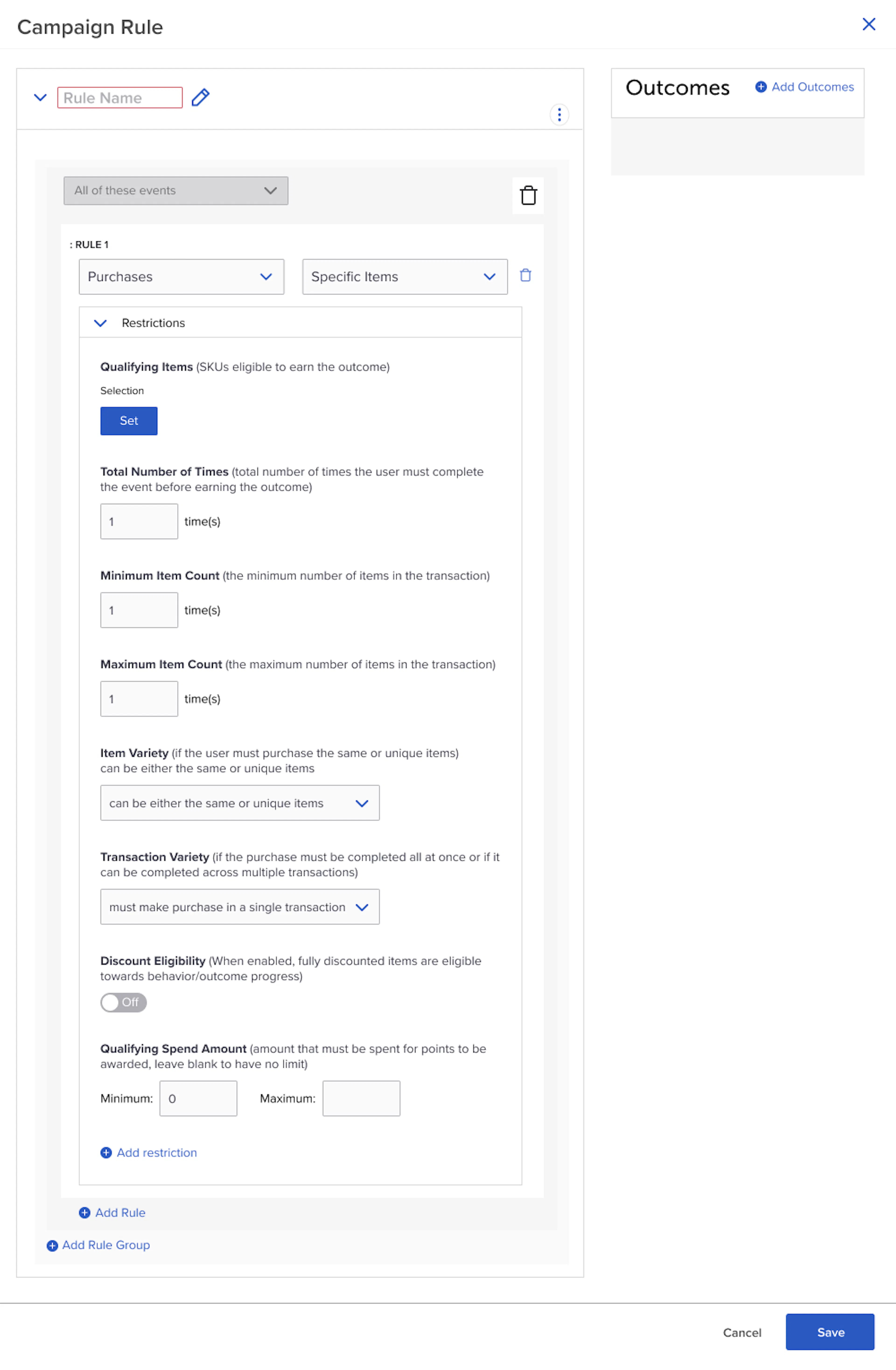
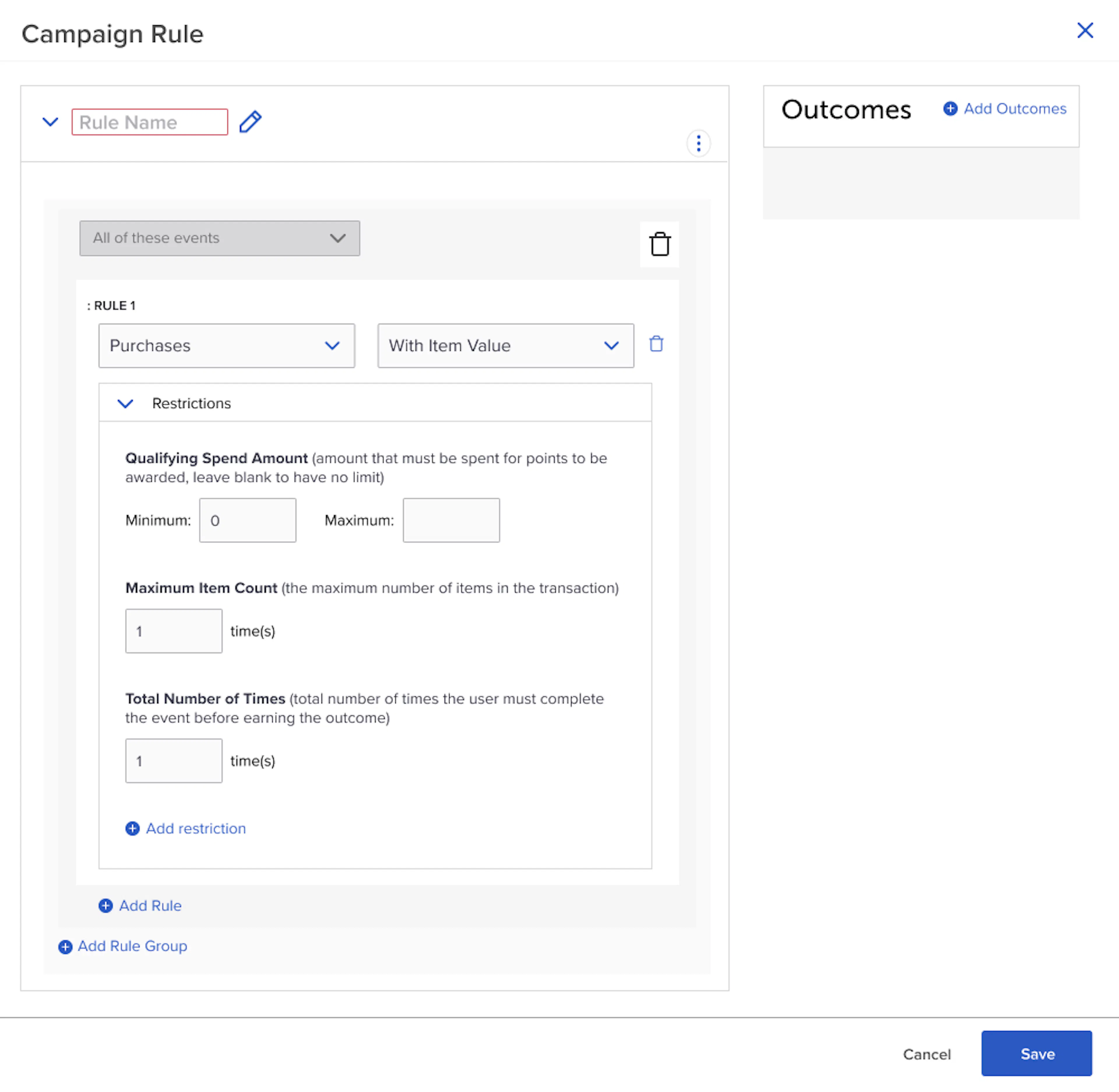
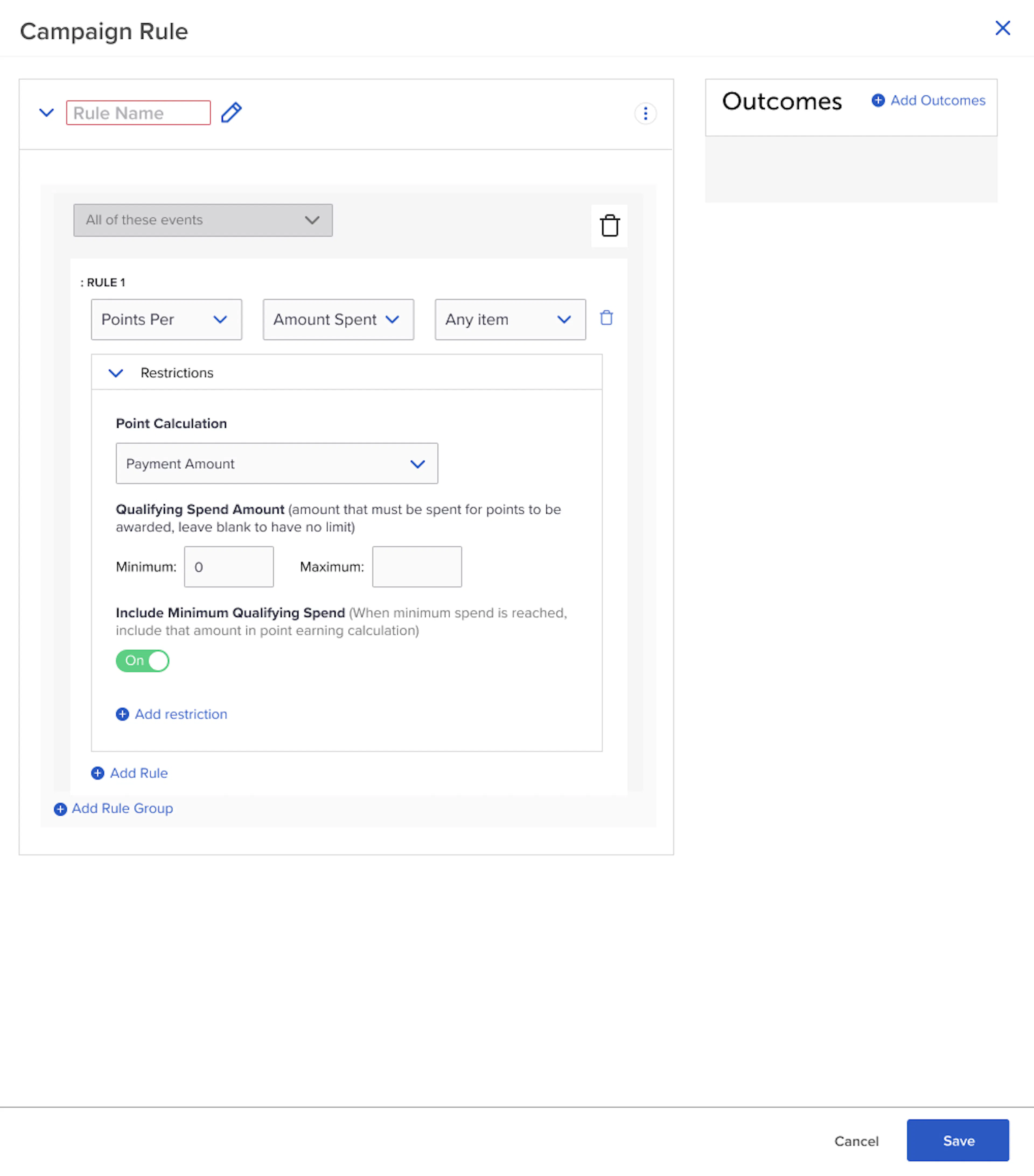
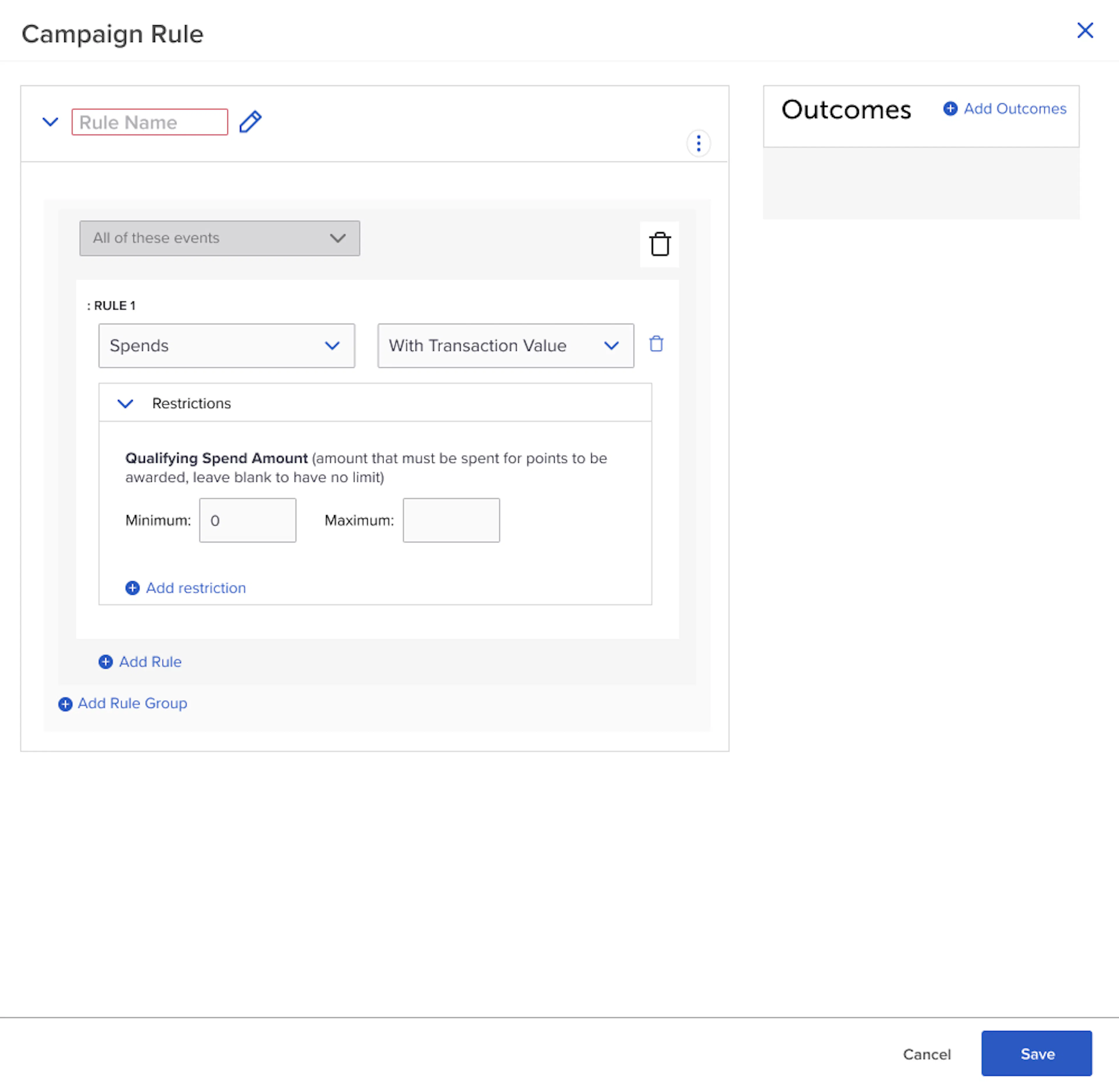
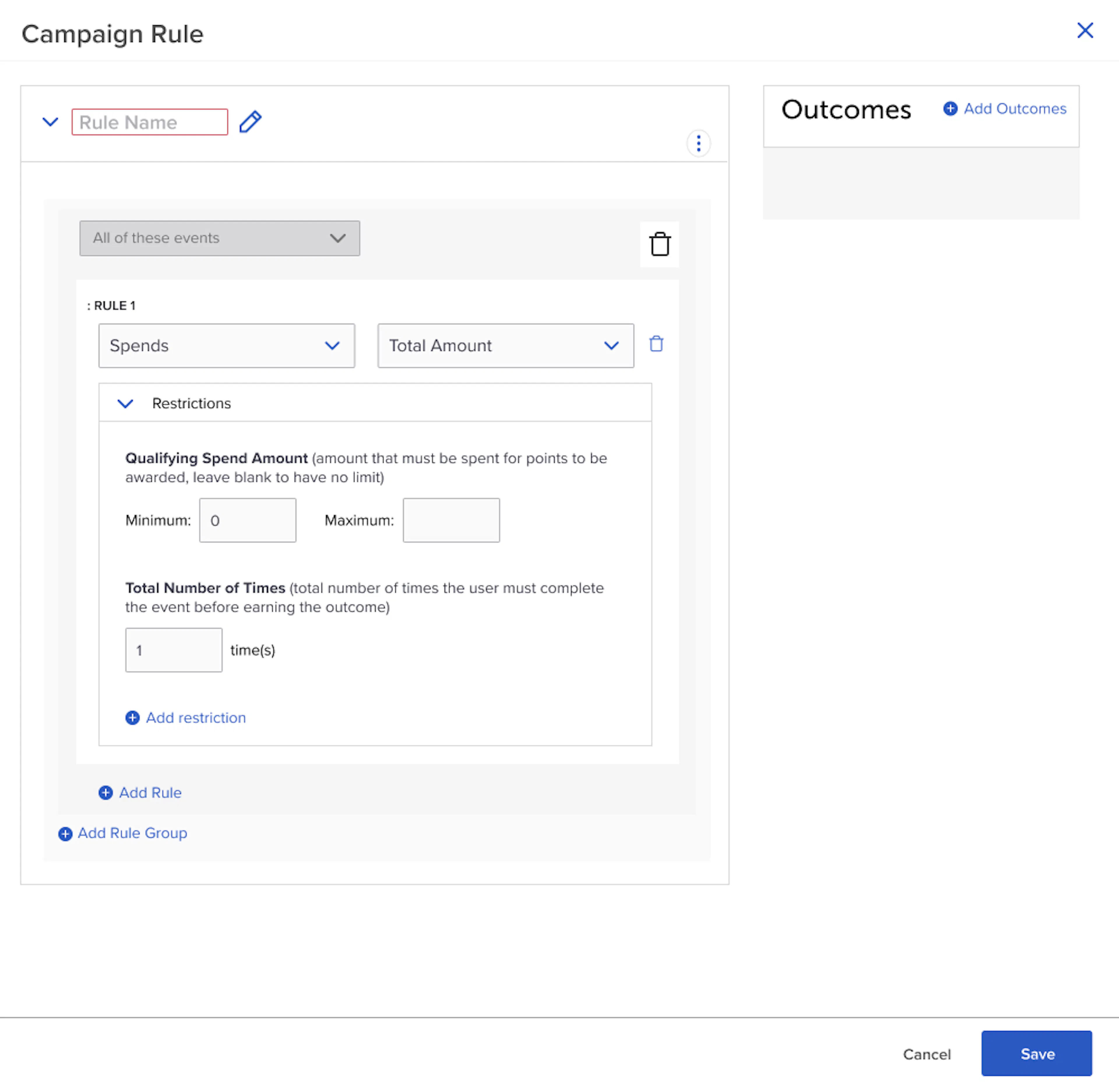
Previously, campaigns could only be configured with a minimum spend threshold to trigger specific behaviors. This limited marketers who wanted to create more nuanced reward strategies based on spend ranges. With this enhancement, SessionM now allows customers to define both minimum and maximum spend thresholds, enabling more granular control over how spend-based behaviors are triggered.
This functionality empowers brands to offer tiered rewards, tailor experiences across various spend levels, and better align campaign goals with customer behavior.
Note: this new option is only supported for behaviors that evaluate spend of a single transaction. Support for use cases that evaluate spend over multiple transactions will come in the next release.
How it Works for Spend Range Restrictions in Campaigns
With this update, users can define inclusive spend ranges across the following behavior types:
- Purchases → Specific Items
- Purchases → With Item Value (formerly “Minimum Item Value”)
- Points Per → Amount Spent
- Spends → With Transaction Value
- Spends → Total Amount
Key Details
- Both minimum and maximum values are inclusive. For example, a Max Spend of 50 means a purchase of exactly $50 will qualify.
- Maximum amounts support up to three decimal places (e.g., 49.999) and are processed with full accuracy.
- If either threshold is left blank, it is treated as not set, preserving previous behavior.
- Overlapping ranges are allowed. In these cases, all matching outcomes will be awarded.
- Error handling has been implemented to guide users through invalid configurations or conflicts.
Example for Spend Range Restrictions in Campaigns
A user can now configure:
- $10–$49.99 spend → 10 bonus points
- $50–$99.99 spend → 25 bonus points
- $100+ → 50 bonus points
With this new restriction, Merchants can now run tiered spend challenges to incentivize higher average transaction size.
Customers & Audiences
Point traceability reports
Feature Description for Point traceability reports
Available for customers that have migrated to the new Point Engine Upgrade.
As part of the Points Engine Upgrade, SessionM is introducing a new dashboard under the Incentives tab.
How it Works for Point traceability reports
The dashboard provides a clear view of cross-store liability, helping users better understand how points are being issued and redeemed across their store network.
This provides greater transparency into the flow of loyalty points across stores, enabling more accurate liability tracking and improved incentive strategies.
New Transaction Metrics on the Homepage
This functionality is available only to customers with the V1 SessionM Dashboard.
Feature Description for New Transaction Metrics on the Homepage
The Homepage has been improved to provide insights into transaction activity across the program.
A new Transaction section was added under Offers. This means that the SessionM Dashboard now provides an opportunity to swiftly review and act on important information related to Campaigns, Members, Points, Offers, and Transactions.
How it Works for New Transaction Metrics on the Homepage
The reporting provides answers to specific questions:
- What is the total number of transactions over a specific period (daily, weekly, or monthly)?
- How does this transaction volume reflect system usage and overall business activity?
Anomaly Detection Reports
Feature Description for Anomaly Detection Reports
Anomaly detection dashboards have been activated for all clients. These dashboards provide the ability to quickly identify abnormal user behavior and investigate its sources, helping to mitigate potential financial and reputational damage to the brand.
How it Works for Anomaly Detection Reports
Detailed guideline is available here.
Loyalty
Maximum Discount for “Buy X Get Y Percent” Offers
Feature Description for Maximum Discount for “Buy X Get Y Percent” Offers
This release includes an enhancement to the "Buy X Get Y Percent" offer type, giving businesses greater control over their promotions.
With this update, a new Maximum Discount Amount field has been added, allowing merchants to (optionally) set a cap on the total discount applied to an eligible purchase. This ensures that while customers still receive the percentage discount, the discount amount will not exceed the predefined limit.
Key Benefits
- Prevent excessive discounts by capping the total discount amount.
- Maintain profitability while still offering attractive deals.
- Ensure a consistent and controlled discount experience for consumers.
Partial Catalog Updates Now Supported
Feature Description for Partial Catalog Updates Now Supported
Merchants syncing product, location and other types of Catalogs can now perform partial updates instead of full replacements. This enhancement enables more efficient updates by supporting delta uploads to existing catalogs.
How it Works for Partial Catalog Updates Now Supported
- Adding new items or categories to an existing catalog
- Updating item names or external IDs
- Associating items or categories with other categories
- Removing items or categories from a catalog
This functionality reduces data transfer overhead and simplifies catalog management. For more information, refer to the Catalog API documentation.
Point Expiration Summary API
Feature Description for Point Expiration Summary API
A new API returns how many points are projected to expire for a user. This API can be called to power customer facing digital experiences to show members when their points are due to expire. It can also be used to verify your point expiration policies are configured as expected.
How it Works for Point Expiration Summary API
- Submit a request for a specific user and point account(s). If no point accounts are specified then all point accounts will be returned.
- The response will be broken out by point account and will include the date and the number of points projected to be expired. Only non-zero values will be included in the response
- The API will only return results for rolling point expiration policies. User inactivity point expiration policies will not be supported at this time
- This API will only be available for clients who have upgraded to the new Points engine
If you have any question about the availability of this API, please reach out to your SessionM representative. For more information, please see the Point Expiration Summary API documentation
Example for Point Expiration Summary API
Customer has 500 points expiring at the end of the year. The API will return:
"user_id": "72f469ca-854a-11e8-9035-1cf52521e566",
"detail": {
    "point_account_id": "2f1c0571-14f4-4b5c-8709-4bc75a9c4e94",
    "amount": 500,
    "expiration_date": "2025-12-31T00:00:00"
}
Loyalty2
Update Tier Membership During Return Scenarios
Feature Description for Update Tier Membership During Return Scenarios
Members of a loyalty program make purchases that qualify them for a higher tier. If they return that purchase, SessionM’s new loyalty engine will now determine if they should remain in that tier and downgrade them when applicable. Key improvements have also been made to outcome processing and resulting data.
How it Works for Update Tier Membership During Return Scenarios
- The improvements to return and outcome handling are configurable via a backend setting. Upon release this setting will be disabled to maintain current behavior. If you would like to enable this setting, please reach out to your SessionM representative
- During a return scenario, the loyalty engine will rerun the transaction against any of the rules it made progress against. When applicable it will be able to update the rule progress and revoke any associated outcomes
- The engine can revoke tier change outcomes to ensure the user is placed in the proper tier. These outcomes can only be revoked if the user remains in the tier they were explicitly moved to.
- For example, a user makes a purchase that awards an explicit outcome to move them from the Silver to the Gold tier. If the user is no longer in the gold tier at the time of the return, the engine will not move them down to silver
- The engine is unable to revoke the following outcome types:
- Tags
- Auto-Purchase
- Trigger Event
- Reward Store
- The engine can revoke tier change outcomes to ensure the user is placed in the proper tier. These outcomes can only be revoked if the user remains in the tier they were explicitly moved to.
- If points are returned, it will produce a record in the Point Audit Log with a reference type of INCENT.Outcomes (Refund). This allows for easier identification of point return scenarios. Unlike the other enhancements, the new reference type will be available to everyone with the release. It is not dependent on the setting mentioned above.
- The loyalty engine will then rerun all current balance tier entrance rules to determine if the user should remain in the current tier. If they no longer qualify, they will be demoted to the lower tier. They can be demoted multiple tiers during this operation.
- This will be configurable via a platform setting. Upon release this setting will be disabled to maintain current behavior. If you would like to enable this setting, please reach out to your SessionM representative
- This setting requires you to also enable the new setting for improved return and outcome handling mentioned above
- As mentioned above, this process will only take into account current balance rules. It will not include historical rule conditions such as:
- Purchase events (past)
- Points/other events (past)
- If a user is demoted, the loyalty engine will revoke the outcomes the user received for entering the tier
- This will be configurable via a platform setting. Upon release this setting will be disabled to maintain current behavior. If you would like to enable this setting, please reach out to your SessionM representative
- The system will now respect tier entrance outcome caps. For example, tier entrance rules can only be achieved one time. A user makes a purchase that qualifies them for this tier and they receive the associated outcome. If they return the transaction, they will be demoted into the lower tier and the outcome will be revoked. They will then be eligible to earn the outcome again if they progress into the next tier again
Point Simulation API
Feature Description for Point Simulation API
A new API supports submitting a transaction to simulate the outcomes that will be given from the Loyalty engine. This API can be used to display the estimated number of base points a customer will receive from a purchase. It can also be used to test different loyalty rules without saving any data.
How it Works for Point Simulation API
- Submit a transaction for a user. Both internal and external user id will be supported
- The API will return all outcomes that would be awarded by the base earn rules in the user’s current tier. It will not return outcomes from tier entrance rules (ex. the transaction qualifies the user for the next tier and are thus eligible for an outcome)
- The API will aggregate the points awarded per point account so it can be easily displayed to the end user
- The API will not simulate outcomes from Campaigns (ex. bonus points)
- This API will only be available for clients who have upgraded to Loyalty 2
If you have any question about the availability of this API, please reach out to your SessionM representative.
Example for Point Simulation API
User is making a purchase online that will award them 250 points. The API will return the following:
"points_to_award": [
    {
        "point_account_id": "bbd0ce26-1c32-4830-b100-6954f1725093",
        "point_account_name": "Spendable Point Account",
        "total_points": 250
    }
]