

January 2024 Release Notes
SessionM platform release notes for January 2024 (release version 2024.1).
DETAILS
| Release to Staging | Release to Production | Release Version |
|---|---|---|
| Jan 3 - 8, 2024 | Jan 22 - 25, 2024 | 2024.1 |
No downtime is required for the release.
Release Notes Updated
As of January 22nd, we made the following updates:
- Changed the transaction payload limit from 1 MB to 300 KB. See the entry marked UPDATED JAN 22 under Loyalty Improvements.
As of January 3rd, we made the following updates:
- Added a new item under bug fixes in the Campaigns section, marked ADDED JAN 3.
- Removed the following item from the Campaigns Improvements list: Added an “Is Null” option for Birthday segments to allow targeting of users with a null birthday.
Customers & Audiences
Composer Optimizations
Audiences and Exports Generate as Soon as Data is Refreshed in the Data Cloud
Currently, Composer does not know when the Data Cloud finishes its daily hydration jobs. To account for this, Composer refreshes dynamic audiences twice a day (roughly every 12 hours). This process adds stress to many systems and often results in audiences and exports refreshed with incomplete data.
Moving forward, the Data Cloud will be sending Composer a signal when data hydration starts and ends for a tenant. Composer will trigger the refresh of audiences and exports shortly after receiving the successful end signal. This change will allow audiences and exports to be generated with fresh data before the time they are needed, rather than generating them at preset times.
This change impacts the usage of custom databases (for example, mazu_ext) in Composer. If you have any questions, please contact your Customer Success representative.
Reduced Chance of Gaps in Audiences During Refresh Window
Today, Composer assigns users to an audience via tags. With the previous twice-a-day refresh cadence, each tag had an expiration date of 12 hours. During audience refresh, Composer would generate new tags and assign them to users. This led to windows of time in which Composer audiences had 0 users.
With this enhancement, Composer will be using tag versioning. Instead of reproducing the same tag, Composer will increment the tag. For example, a tag of audience_v1 will become audience_v2 after refreshing. Composer will then assign the new incremented tag to users and delete all previous iterations of that tag. The tags will have an expiration date of 72 hours, which ensures users are assigned to an audience even if there are temporary issues.
Please note that this change has implications for how you can use a Composer audience for campaign targeting in the Campaigns Module. Previously, you could select "Add Segment" then "Tag" and input the tag information when setting up your campaign targeting. However, with tag versioning, the tag will change with each refresh, making the tag entered for targeting obsolete. The new way to target is to select "Add Segment" and then choose "Audience." You will then enter the Composer audience that should be used, thus ensuring that the targeting automatically updates upon each refresh.
Robust Scheduling and Error Recovery
Composer uses Athena, which has a limit per region that dictates the maximum number of queries that can run at the same time. When Composer schedules audiences and exports to be run, it will check the number of jobs currently running against the Athena limit. If there is capacity it will schedule more and if not, it will wait to schedule more jobs. This will maximize output without overloading Athena.
Composer has a small number of audiences and exports that fail every day. Previously, Composer would retry the failed jobs in a linear way (e.g. retry in 15 minutes). Now, Composer has a smarter retry mechanism that will increase the time between each retry. For example, the first retry will happen in 15 minutes but if it fails again, it will wait 30 minutes to retry again. This will minimize support issues related to temporary problems.
Search Bar for Exports
Previously, Composer provided search capabilities for the audience and queries tab but not for the exports tab. You can now search for your audience and query exports, which provides full search functionality across the list views in Composer.
Improvements for Composer Optimizations
- Composer:
- Previously, users were only able to delete Composer audiences in a draft state. Moving forward, users can delete Composer audiences in any state besides live and activating
- The schema navigator in the query builder previously showed a maximum of 100 tables. Now, it will show all tables in a client’s schema so they can easily reference them when building a query
- Changed the “Type” column in the Audiences list view from the purpose of the audience (standard or export-only) to the refresh type of the audience (static or dynamic)
- Improved the user experience by removing the Query Snippets dropdown from the query builder
Loyalty
Improvements for Loyalty
- UPDATED JAN 22: Transactions: We raised the transaction payload limit, extending support from 32 KB to a maximum of 300 KB. Please be aware that the supported transaction size limit is dependent on the configuration of the individual client environment and client's use cases.
- APIs The below APIs will now return 400 Bad Request: “A valid user id is required” for any request that contains a user ID with more than 50 characters. These APIs have never supported user IDs with more than 50 characters, but would return an unclear error: “500 Validation failed for one or more entities.” This change brings clarity to the issue within the payload when a user ID contains more than 50 characters.
api/1.0/movement/qualifyingapi/1.0/movement/move_userapi/1.0/movement/remove_usersapi/1.0/triggers/process_scanapi/1.0/triggers/process_eventapi/1.0/user_events/trigger_user_eventapi/1.0/user_points/spend_multiple
- The below API will now return a 400 error with the validation error message of “Value was too long. Value cannot be null, cannot be with space only, and must be no more than 50 characters in length.” if the request contains an invalid user ID:
/api/1.0/point_audit_logs/fetch_point_audit_logs
Bug Fixes for Loyalty
- When we released the idempotency for the Purchase Reward Store Offer endpoint, the production HTTP response codes were not updated. We now have updated the response codes to reflect a 409 response when a call is made with the same
user_idandrequest_id. - Resolved an issue with our Catalog (version 3), where setting an item as a modifier was not functioning, preventing clients from using modifier items in campaigns.
Campaigns & Content
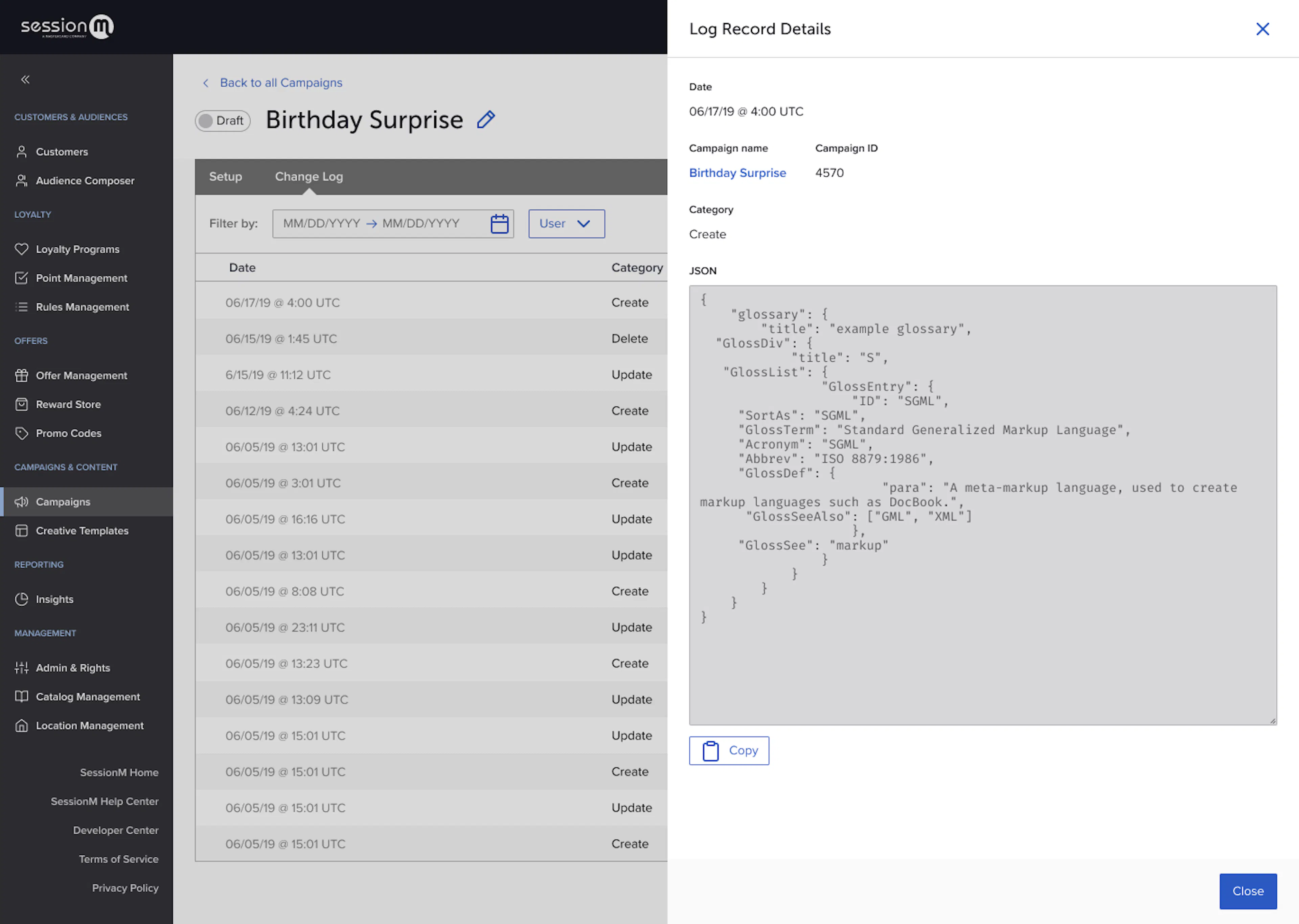
Added Campaign Audit Log
Previously, we were unable to easily determine changes made to Campaigns. We have developed a Campaign Audit Log feature that will track and display the actions of platform users in the Campaigns module.
It will allow you to do the following:
- Determine the who, when, and what of changes to a campaign
- The “what” of the changes will be presented as a high-level type (ex. “Create”) accompanied by the details shown in raw form. The details may not be easily interpretable but at a minimum they will be valuable to our internal SessionM teams
- Filter the audit log data in the UI by:
- User
- Campaign
- Timeframe
- Export the audit log data to a CSV file
- The data will also be available in a Mazu table called “Audit_logs”
There will be two new tabs added that will be both be named “Change Log.” One tab will be located on the Campaign index page (“All Campaigns”) and will contain all audit log data for that environment. The other tab will be located on the Campaign detail page and will have the same functionality but it will be pre-filtered to only show audit log results for that campaign.
Improvements for Added Campaign Audit Log
- Campaigns:
- Updated the Outcome drawer to behave similarly to the Behavior drawer. Both drawers will now have "Cancel" and "X" options available for closing the drawer. When clicked, they will check for unsaved changes and prompt to either save the changes or lose their updates. Previously, the Outcome drawer did not have a “Cancel” option and it would temporarily save the changes even when “X” was clicked
- Standardized the logic and format of the confirmation messages that are shown when you make a change and exit the screen without saving. This will help minimize user error and increase consistency within Campaigns and across the platform
Bug Fixes for Added Campaign Audit Log
- Previously, there could be a scenario where a campaign could issue points from a point source with a cap. So, if the point source reached this cap, the campaign would not issue points to the user. However, a gap arose where the transaction that initially qualified the user for the campaign was returned. If a user returned said transaction but was never initially issued points because the point source reached its cap, the campaign would still try to deduct points from the user. This fix enabled campaigns to know whether the points issuances at the time of the transaction was a failure. Thus, users who were never issued points because of the point source cap would not have points deducted.
- Fixed issue where opted_out column in the customer search result table in the SessionM UI would appear, but would never be populated with values. Now it is populated with the corresponding values.
- There were inconsistencies in the casing for tags stored in various tables in the backend and in the frontend for the Campaign UI set up. Fixed consistency in casing for tags between the display in the UI and in the backend when viewed in the Data Cloud.
- For the promotions/claims endpoint in an API call, a 500 error would been returned if there was a validation error. This is incorrect because a 500 error indicates to the user to retry, even though a validation error means that something needs to be changed in the call. Now, there is a 400 error for validation errors for the promotions/claims.
- For clients using “0 point” reward store offers, after the first offer redemption, the offer appears in the user’s wallet as a “0 point” reward store. When merging two customer profiles however, these offers would not merge and cause an error. Now, customer profiles can be merged without an error from these “0 point” reward store offers.
- When merging two customer profiles, previously, a gap would occur where only 10 offers in a user’s offer wallet would be moved regardless of how many offers were actually in the wallet. After this bug fix, the number of offers present in the wallet will be moved without any error.
- ADDED JAN 3: Fixed an issue where the order of operations of point rounding in Campaigns “Always Round Up” option was changed, causing discrepancies in point awards for use cases with specific point earning rates. This change restores the original point calculation and rounding logic. In addition, test coverage was improved and redundancies added to prevent this type of breaking change from occurring again in the future
Reporting & Analytics
Improvements for Reporting & Analytics
- Insights:
- We’ve added the following new metrics to the Insights module:
- Breakdown by gender added to profiles and membership overviews
- Transaction count by channel
- Full list of new users in the previous 7 days (lookback range is configurable)
- Average Order Value (AOV) by store
- We’ve added new Anomaly Detection dashboards covering the following use cases:
- Frequent transactions - Employees using their own account for customer purchases
- Multi-accounting - A single user creating multiple accounts
- Shared accounts - Multiple users sharing a single loyalty account
- Added support in Insights for leaf-level organizations for clients in the Organization Management setup
- We’ve added the following new metrics to the Insights module:
- Data Lake: New table has been introduced to the mazu - Audit_logs. This table contains information about activity of end users in the platform (e.g. what user changed, what configuration at what time in platform). In this release, the table will only contain data from the Campaigns module. While this table will be queryable in Composer, it will not be present in the daily data exports. You can download this data in a CSV file from the UI. (Please see the Campaign release notes for more details.) In a future release, this table may be added to the daily data exports.
Customers & Audiences
Composer Enhancements
We made the following updates to Composer audience queries to ensure accurate and consistent audience counts in both the Composer module as well as the Audiences module:
- Updated logic to remove duplicate users
- Updated logic to handle user IDs in both upper and lower case
Customers Bug Fixes
- Previously, there were some Offer types that had the option to be manually redeemed, but would always fail. This release fixes this issue and now all Offer types can be manually redeemed from the Customers module.
- When initially creating a SessionM profile, a primary external id is created. In addition to this primary external id, there can be multiple other external ids associated with a customer profile. There was a bug where when making an update call with a different external id, that external id would become the primary external id, which would cause issues with other calls using the primary external id. The fix prevented the primary user id from changing because of update calls with other external ids.
Campaigns & Content
Updated Options for Points Per Outcomes
We have improved the rounding options in campaigns for points per outcomes to align with Loyalty rules. The most notable changes are:
- Introduced a new setting that allows clients to control the point rounding precision on their Campaigns
- The original choice of “No Rounding” was renamed to “Round Up (Configured Decimal)”. Previously, the option always rounded up to the 3rd decimal. Now, users will be able to define which decimal place this option rounds to based on the new setting. To start, all clients will have their setting set to 3 to maintain existing campaign functionality.
- A new choice named “None” was added which truncates the value at the new setting.
- Campaigns can now support outcomes that contain up to 2 decimal places (ex. 0.25 points per $1.50)
Existing options were renamed and reordered to match Loyalty rules. Below are the updated choices and how they function:
In the examples below, we are assuming the point rounding precision setting has been set to 2.
- Round Up (Configured decimal) – “10.777” becomes “10.78”
- Round Down - “10.777” becomes “10”
- Round Up (whole number) – “10.777” becomes “11”
- Round Up 5 – “10.777” becomes “11” whereas “10.444” becomes “10”
- None – “10.777” becomes “10.77”
In addition to the above, we have also updated the Customers module to support the following:
- Manual point adjustment up to 2 decimal places
- Manual point adjustment of less than 1 point
Campaigns Bug Fixes
- The behavior outcome summary was being updated for most outcomes and their fields, except “Automatically trigger external message to customers when points are awarded” in “Point (Incentives)”. The text was added only after saving the behavior. With this release, the summary will update in real-time while filling in each field of the outcome form.
- Fixed an issue where clicking on the default option in Transaction Variety Restriction reset the Total number of times to 1, or the number disappeared.
- Fixed an issue where special characters were not displayed correctly in notifications after saving a behavior template with a name that contains special characters like
' “ / &. Now the template will save correctly with special characters
Loyalty
Point expiration in Loyalty 2
As we continue to build out our Loyalty 2 product, we plan to release enhanced point expiration functionality for inactive users in 2025. In the interim, the ability to configure the point expiration based on user inactivity functionality is disabled in the SessionM platform interface for Loyalty 2. For clients who currently have point expiration based on user inactivity, we will continue to support the legacy functionality after you upgrade to Loyalty 2. Please contact your SessionM Customer Success representative for more information.
Qualifying items not in product catalog in Loyalty 2
We’ve added support to Loyalty 2, at the rule level, to determine whether items that are on a transaction but not within the SessionM catalog qualify for the rule outcome. This only applies to rules with a catalog constraint. We’re introducing this in stages, and currently it can only be set by SessionM. In our next release we will introduce the ability to set this in the rule builder UI. Until then, please contact your SessionM Customer Success representative for more information.
Reporting & Analytics
Insights Enhancements
- We've enhanced the usability of the Insights dashboard and added new visuals with daily breakdown centered on transaction counts by payment type.