

April 2023 Release Notes
SessionM platform release notes for April 2023 (release version 2023.3).
DETAILS
| Release to Staging | Release to Production | Release Version |
|---|---|---|
| April 3 - 5, 2023 | April 18 - 24, 2023 | 2023.3 |
No downtime is required for the release.
Release Notes Updated
April 13th, we added an item under Composer Improvements, marked ADDED APRIL 13.
Customer Data Activation
Enhancements to Composer Audience Export
These features are initially being rolled out in a pilot program to select clients to monitor their performance before being made available to all clients. If you have any questions about these features or would like to be part of the pilot program, please contact your Customer Success representative.
Parity with Audience Module Exports
Previously Composer could only export a raw list of members from an audience to an SFTP site with limited timing customizations. Now it achieves parity with the Audience Module export functionality and introduces a new feature.
Parity Features:
- Customize the export name and filename.
- Set configuration settings such as delimiters, destination, and encryption.
- Select attributes that you want to include in the export.
New Feature:
- Schedule exports to occur at once or repeat on a custom schedule (for example, repeat weekly every Monday).
The procedures guide for Composer Audience Export has been updated to reflect this new functionality.
New sub-tabs on Exports tab
The Exports tab on the Composer homepage now has 3 sub-tabs:
- Audience Exports (like the Configurations tab from the Audience Module).
- Audience Export History (like the History tab from the Audience Module).
- Query Exports (like the Configurations tab, but for all query exports).
- To view the query export history, click on the horizontal three-dot menu icon (found on the right side of a query export) and then click on “View History.”
Distinct audience types
You can now activate two distinct types of audiences:
- Standard, which can be used throughout the SessionM platform (for example, in campaigns) and can be exported. All earlier Composer audiences ran like standard audiences.
- Export-Only, which can only be exported. If you only plan to export an audience, activate it as an Export-Only audience.
Enhancements to Composer Live Audience
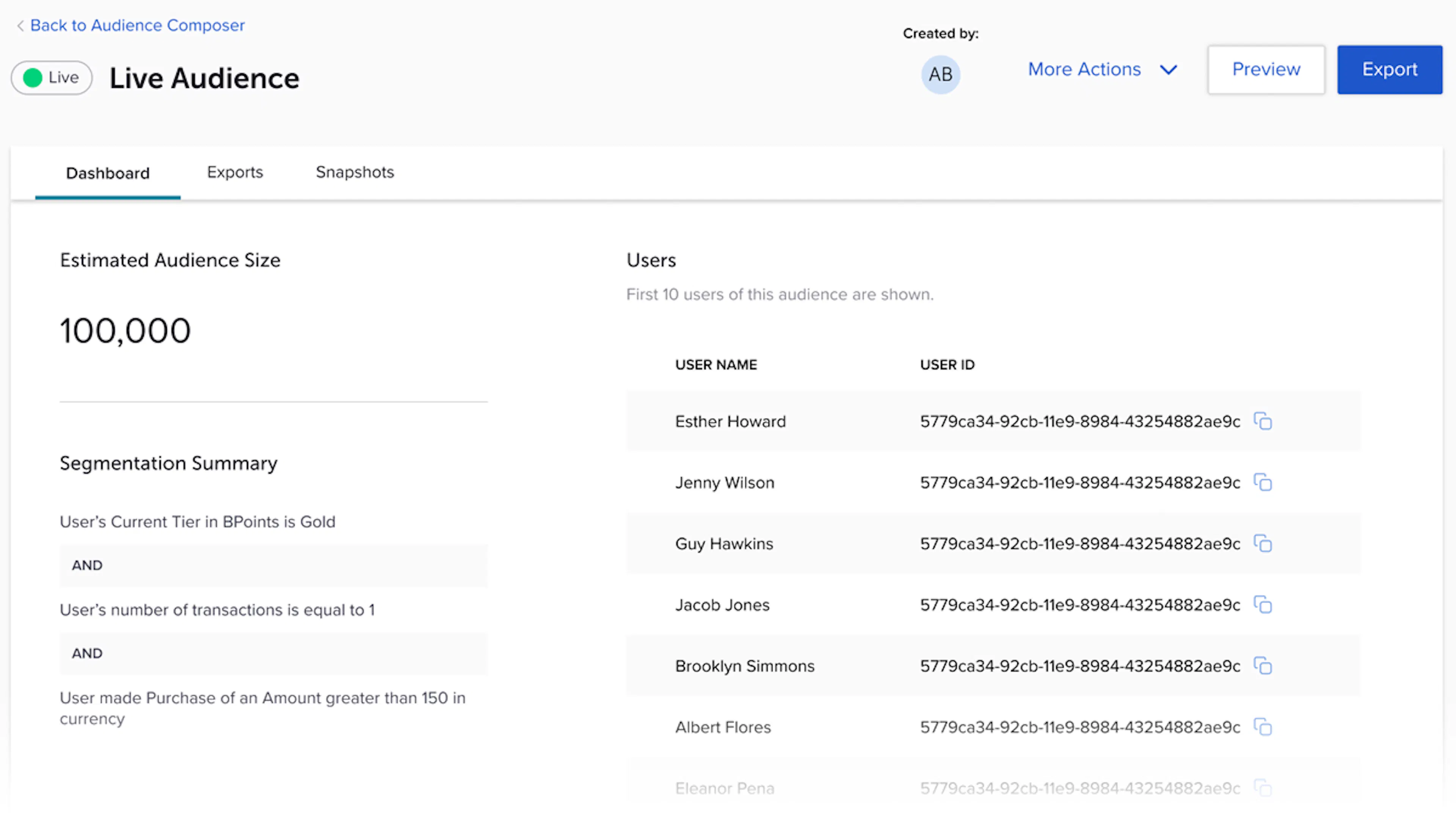
Previously when you clicked into a live audience, you were directed to the Audience Builder or SQL query editor screen. Now when you click into a live audience, you are directed to a Dashboard tab that shows the following components:
- Estimated Audience Size
- Segmentation Summary
- Sample Users button that, when clicked, lists the first 10 members in the audience.
A new Exports tab lists the configurations and history of the exports for that audience. The behavior for draft audiences does not change. When you click into a draft audience, you are directed to the audience builder screen.
Improvements for Enhancements to Composer Live Audience
- Composer:
- The back-end logic for the “Within the past” operator on the Purchase and Custom Attribute cards has been improved. A new upper-bound time constraint prevents transactions timestamped for the future from being listed.
- ADDED APRIL 13: The back-end logic for the Offers cards has been updated to reflect the
root_offer_idinstead of theoffer_idbecause theroot_offer_idnever changes and thus ensures the most accurate results. This update will not affect live audiences built from the Offers card before this release. All other saved audiences that are updated after this release or new audiences will reflect this change.
- New look for Insights & Composer: As part of the platform refresh, the Insights and Composer modules now have the new Side Navigation and header introduced in the last release.
Changes in Composer Functionality
- Creating an audience from the SQL query editor: To help us better distinguish between data exploration and audience segmentation, you can no longer create an audience from the SQL query editor. All previous audiences created by this method will be moved into an SQL custom card in the audience builder as a part of the release. These audiences will not change state (live, draft, expired, etc.) and their refresh timing will not change. Moving forward, you can use the SQL custom card to build audiences with raw SQL queries. However, this card only supports queries that select an internal SessionM user ID as the end output (not external user ID as the SQL query editor previously did).
- Deactivating a live audience: To prevents users from deactivating an audience and affecting any downstream uses of that audience (for example, in campaigns), you can no longer deactivate a live audience. Once activated, audiences stay active until their end date. If you would like to use the audience for another purpose, you can duplicate the audience to create a copy in an editable draft state.
Loyalty & Offers
Inventory restriction improvements to zero-point reward store offers
Zero-point reward store offers can now handle both the offer's global and personal inventory restrictions. Clients can choose to hide offers in the customer's wallet when inventory restrictions are in place. By default, offers continue to appear in a customer's wallet unless this setting is activated.
Please contact your Customer Success representative if you would like this setting activated.
Bug fixes
- Fixed an error in the MergeUser_V4 endpoint that caused incorrect point totals for members.
- ExecuteUserInactivityPointAccountExpirationPolicies_V8 failed and set the job runtime to the time it completed. The job runtime now remains set to its original time and not to the time it finished.
- Fixed a bug that caused the UI to hang when saving a third-party promo code list.
Personalized Engagement
Improvements to launch campaigns with numerous messages
Previously, campaigns with more than 10 or so scheduled messages would fail to launch because the system took too long to determine if the audience for each message had at least 1 member. This release supplies an environment-level setting that disables this check, so that clients who frequently configure campaigns with many scheduled messages do not run into this issue.
Please contact your Customer Success representative if you would like this setting activated.
Configurable limit on relaunching completed campaigns
To avoid issues with relaunching completed campaigns, we've added a configurable setting that limits the ability to re-launch a completed campaign after a specified number of days has elapsed. The minimum setting is 20 days and the maximum is 100 days, with a default of 60 days.
Please contact your Customer Success representative if you would like a setting other than the 60 day default.
Configurable teaser period for campaigns requiring opt-in
Campaigns requiring opt-in return in the API 24 hours before the opt-in Start Date and Time. We've added a setting that allows you to configure the number of hours ahead of time that these campaigns start to return in the API. For example, if you want campaigns to only start showing up an hour before the Start Date and Time, the setting would be set to 1 hour. (While 0 is an allowed value, we recommend at least a one-hour buffer to allow the campaign to be fully activated before traffic starts to be processed for it).
Please contact your Customer Success representative if you would like this setting activated.
Improvements for Configurable teaser period for campaigns requiring opt-in
- SFMC Journey Selection - Pagination: When setting up an SFMC Journey Trigger message in the Campaigns Module, we improved the user interface by adding pagination to the selection modal and removing the limit on how many active journeys can be displayed. This change gives clients the flexibility to select from all possible active journeys.
- Event Idempotency: The Events API has been enhanced to handle properly submitted events requests with idempotency. The API supports a
transaction_idrequest attribute. When a duplicate request is sent with atransaction_idthat has already been processed, the response informs the caller that another request with thattransaction_idhas already been processed. Thetransaction_idrequest attribute is optional, and only event requests that specify it will have idempotency enforced. - Customer Profiles - Emojis in first and last names: Emojis were not supported characters in the First Name and Last Name attributes. As a result, API requests to create or update customer profiles containing these characters would fail. Now, when you create or update a user with a first_name or last_name that contains emojis, the create/update action succeeds but the emojis are stripped before the attribute gets inserted into the database.
Platform Wide
Announcing Organization Management for the SessionM Platform
This new feature is available for all clients with this release. If you are interested, please contact your Customer Success representative to evaluate if this feature is appropriate for your use cases and begin the process to configure this for your environment.
Organization Management 1.0 brings multi-org support to the following SessionM modules:
- Customers
- Audiences
- Composer
- Campaigns
- Insights
When enabled and configured, clients can define “organizations” (commonly called “orgs”) that represent different brands, geographic markets, or other organizational divisions that span their enterprise. Users of the SessionM Platform interface are assigned to one or more organizations, which restricts the customer data and program configurations they can access.
Key Product Features
Organization Management – The SessionM Delivery team configures the client's environment to enable multi-org support and defines the following:
- custom profile attribute that designates the organization to which the user belongs.
- organizations that comprise the client implementation.
- images that represent each organization.
- mapping of program configurations to organizations.
Org Selector – Users can be active in one organization at a time. At login, users are active in their first org (if more than one) and can switch between the orgs to which they have access. The last active org is remembered for the next login.
Admin Org – In addition to client-defined orgs, there is an Admin Org account used to create audiences and campaigns across all orgs.
Supported Modules - The modules that support Organization Management (listed above) will all restrict data shown to only the active org. An exception to this is that Composer SQL Editor is unavailable by default and requires a special role for users to access.
Key Product Benefits
Self-Service Support for Multi-Org Programs – For clients that run multiple, isolated loyalty programs across orgs from a single SessionM Platform instance, Organization Management allows marketing teams to operate in a “self-service” mode across supported modules, since their access to customer profiles and program configurations is limited to their own org(s). Other benefits of this model include:
- Enhanced data privacy – Marketers can only see the customer profile data for their org(s).
- Improved usability – The user interface only displays program configurations for their active org.
- Reduced human error – Marketers cannot accidentally deploy campaigns or other activations to an org to which they do not belong, nor can they target customers from one org for an activation meant for another org.
Supported Use Cases
- Assign a customer profile to a single organization, using a specific custom profile attribute as the indicator.
- Assign a SessionM Platform account to one or more orgs.
- Combine Org permissions with granular permissions (for example, Read Only – Campaigns Module + Org A).
- Associate venues/locations, offers, point sources, and tier systems with one or more orgs.
- Associate venues/locations, offers, point sources, and tier systems with the “all-org” org for tenancy-wide activations.
- Create an audience or campaign scoped to one org.
- Create an audience or campaign scoped to “all-org” org for tenancy-wide activations (for example, global SMS opt-in campaigns).
Non-supported Use Cases
- Assign a customer profile to more than one org at a time.
- Create an audience or campaign scoped to more than one org.